
How to Give 360 Feedback: 7 Steps With Examples for Peers, Managers and Reports
To give good 360 feedback, write about what you’ve actually seen the person do, not who you think they are. Rate only what you’ve observed (use “not observed” for the rest), describe one specific situation for each comment, and give one or two strengths plus one thing that would help them most. Keep it honest but kind, and leave out details that could identify you. Below is a 7-step method, how to adjust it for a peer, your manager or a direct report, and 16 before-and-after examples.
Key takeaways
- Only rate what you’ve seen. “Not observed” is a valid answer, and it keeps guesses out of the person’s averages.
- Use one real moment per comment: the situation, what they did, and what it led to. That’s what makes feedback usable.
- Aim for one or two strengths and one area to improve. More than that usually gets ignored.
- Adjust for the relationship: peers see collaboration, direct reports see management, managers see results and judgment.
- Be candid, especially upward, but stay anonymous-safe: no details that only you would know.
Here’s the thing: most people who search for this aren’t running a 360 program. They’ve just got an email asking them to “share feedback on Alex,” there’s a form with 20 rating questions and a couple of empty comment boxes, and they’re not sure how honest to be. If that’s you, this guide is for you.
And if you’re the one setting up a 360 or sharing the results afterwards, have a look at our guide on how to deliver 360 feedback results, which covers the other side of the conversation.
What good 360 feedback looks like
Good 360 feedback is specific, about behavior, and balanced. In practice, that means the person can read your comment and picture the exact moment you mean, and they know what to keep doing or try differently. Two simple frameworks can help:
- SBI (Situation, Behavior, Impact): “In the Monday stand-up (situation), you cut the update short when it went off track (behavior), so we finished on time and got to the blockers (impact).”
- Start, stop, continue: one thing to start doing, one to stop, one to keep. It’s great for the open questions at the end of most 360 forms.
You don’t have to use either one word for word. But if a comment has no real moment and no behavior in it, it’s usually too vague to help.
How to give 360 feedback in 7 steps

1. Read the whole form first
Skim every question before you answer any of them, so that you know what’s coming and don’t repeat yourself. It also helps you spot questions about things you simply haven’t seen.
2. Think back over the last six months
Most of us tend to remember the last two weeks best, which is called recency bias. So take two minutes to jot down three or four moments from the last six months: a project, a meeting, a hand-off. These become your examples.
3. Rate only what you’ve observed
If you haven’t seen someone run a budget or present to the board, choose “not observed.” Guessing really distorts their results, given that your score gets averaged with everyone else’s. There’s more on the rating scale below.
4. Write one or two strengths
Start with what they do well, and make it specific. “Great communicator” feels nice but tells them nothing. “You summarize decisions at the end of every meeting, so nobody leaves confused” tells them exactly what to keep doing.
5. Pick one area that would help them most
Not five. One. Ask yourself: “If they changed one thing, what would make the biggest difference to the people around them?” Then describe a real moment and, if you can, suggest what would help.
6. Adjust for your relationship
A peer, a manager and a direct report see different parts of someone’s work. So focus on what your role actually lets you see. The section below covers each one.
7. Re-read before you submit
Read your comments as if you were the person receiving them. Would you be comfortable saying this to their face, calmly? Could they act on it? Could a detail give away who wrote it? If the answer to any of these is no, edit it.
Tip: Most 360 surveys take 10 to 20 minutes. If you’re rating several people, do them on different days, so that you don’t start copying the same comments across.
How to answer the rating questions
Most 360 forms use a 1–5 scale. The labels vary, but here’s how to think about each number, so that your ratings mean the same thing as everyone else’s:
| Rating | What it usually means | Use it when… |
|---|---|---|
| 5 Strongly agree | A clear, consistent strength | You’d point others to this person as an example |
| 4 Agree | Does this well most of the time | Solid, with the odd exception |
| 3 Neutral | Mixed, or sometimes yes and sometimes no | You’ve seen both, not because you’re unsure |
| 2 Disagree | Noticeably inconsistent | It gets in the way more than occasionally |
| 1 Strongly disagree | A real gap | It regularly causes problems for others |
| N/O Not observed | You haven’t seen it | Always better than a guess |
Three common traps to watch for:
- Middle-of-the-road: giving everything a 3 to stay safe. It tends to hide the real strengths and gaps the person needs to see.
- Halo effect: rating everything high because you like them, or low because of one bad week.
- Grade inflation: giving all 5s. If everything is a strength, nothing is.
FeedbackRipple · First 3 people free
Help raters give better feedback
FeedbackRipple keeps raters anonymous and gives them gentle writing prompts, so that comments come out specific. Your first 3 people are free.
How to give 360 feedback to a peer, your manager or a direct report
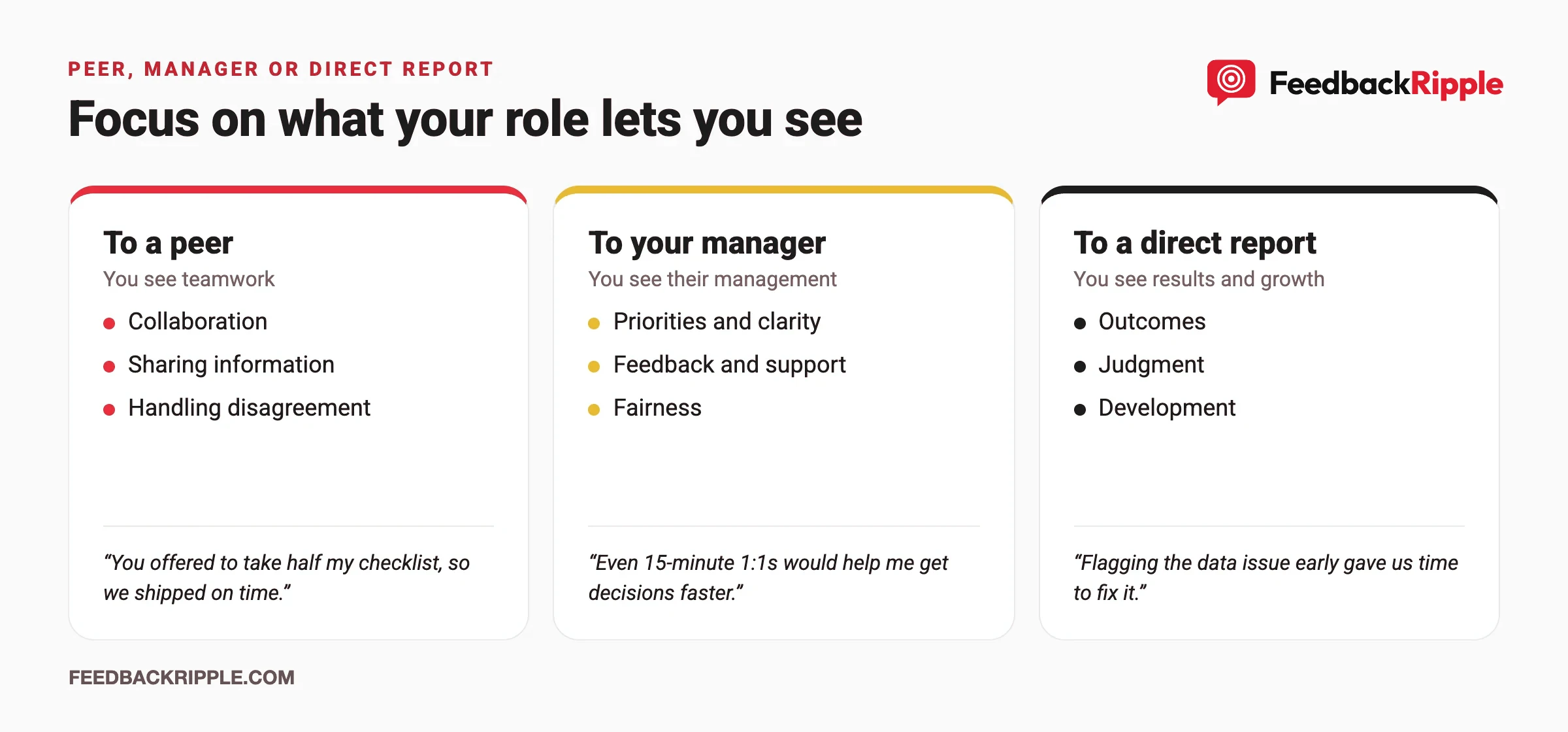
Giving 360 feedback to a peer
Peers usually see how someone works with others day to day. So focus on collaboration, sharing information, reliability and how they handle disagreement. For instance:
- “When we split the launch checklist, you finished your half two days early and offered to take some of mine. That’s why we shipped on time.”
- “In design reviews, you sometimes push back before people finish explaining. Letting them finish first would make the discussion feel more open.”
Giving 360 feedback to your manager (upward feedback)
This is the one people worry about most. But your manager genuinely can’t see how their management feels from the other side, and that’s exactly what you can tell them. Focus on priorities, feedback, support, fairness and communication. Be specific and calm, and frame the improvement as what would help you:
- “You explain why our goals matter before you hand out the work. At the Q3 kickoff, that’s why everyone knew which projects to drop.”
- “In planning meetings, the same two people usually do most of the talking. Asking the quieter ones first would help you hear everyone.”
There are more examples of feedback for your manager in our 360 feedback examples guide, and our page on upward feedback explains how teams keep it safe.
Giving 360 feedback to a direct report
As their manager, you typically see results, judgment and growth over time. So connect your comments to outcomes and development, and remember they may weigh your words more heavily than anyone else’s:
- “You spotted the billing bug in testing and wrote it up with clear steps to reproduce, so engineering fixed it in a day. Keep doing that.”
- “Your updates to leadership start with the background. Opening with your recommendation would get you a decision faster.”
16 examples: weak vs strong 360 feedback
Most weak feedback isn’t unkind. It’s just vague, so the person can’t do anything with it. Here’s how common comments can be rewritten:
| Weak | Strong |
|---|---|
| “Great job this year.” | “The vendor migration finished a month early because you mapped every dependency up front.” |
| “Good communicator.” | “After each sprint review, you post the three decisions we made and who owns each one, so nobody has to ask.” |
| “Needs to be more proactive.” | “Twice this quarter, problems with the release only came up on the day. Flagging them when you first spot them would help.” |
| “Very supportive.” | “When I was new, you walked me through the reporting tool twice without making me feel slow.” |
| “Can be negative.” | “In planning, your first response to new ideas is usually the risks. Starting with what could work would help people stay open.” |
| “Strong leader.” | “You explained why we were changing the roadmap before we heard it elsewhere, which helped me explain it to my team.” |
| “Disorganized.” | “Meeting notes and next steps often arrive days later. Sending them the same day would keep projects moving.” |
| “Team player.” | “When the support queue doubled in March, you took the overnight tickets for a week without being asked.” |
| “Micromanages.” | “You often ask for updates several times a day on tasks that are on track. A daily check-in would give us more room.” |
| “Smart.” | “Your pricing model caught an error in our assumptions that would have cost us a big client.” |
| “Needs to listen more.” | “In the last two retros, you responded before people finished their point. Pausing first would help them feel heard.” |
| “Reliable.” | “If you say you’ll do something in a meeting, it’s usually done by the end of the week.” |
| “Too quiet.” | “You share great ideas with me after meetings. Saying them in the meeting would help the whole team.” |
| “Doesn’t delegate.” | “You kept the client presentation yourself even though Sam had asked for that kind of work. Handing it over would help him grow.” |
| “Good attitude.” | “When the project was canceled, you helped the team move on quickly instead of dwelling on it.” |
| “Should improve time management.” | “The last three reports arrived on the deadline day. Sharing a draft halfway through would let us help sooner.” |
If you want more, there are 122 copy-ready comments in our 360 feedback examples guide.
How candid should you be? (And is it really anonymous?)
Usually more candid than you think. The whole point of a 360 is to show someone things they can’t see on their own, and polite, vague feedback simply doesn’t do that. But candid doesn’t mean harsh: you can be completely honest about a behavior and still be kind about the person.
On anonymity, it depends on the tool and how the 360 is set up, so it’s worth checking. In most 360s:
- Your manager’s ratings are usually not anonymous, given that there’s only one of them.
- Peer and direct-report ratings are grouped, and well-designed tools only show a group’s results when at least three people have answered.
- Comments are typically shown word for word, so your writing style and details can give you away. That’s why it really helps to leave out things only you would know.
You can read how we handle this on our anonymity page. If you’re truly unsure, it’s fine to ask whoever sent the survey how results will be shown before you answer.
Giving 360 feedback across cultures
If your team spans countries, the same comment can land very differently. And given that the person will read it without you there to explain, you have to think a little about how it reads:
- Directness varies. A comment that feels normal in the US or the Netherlands can feel blunt in Japan or Thailand, and a soft UK-style “you might consider…” can be read as optional elsewhere. Describing the behavior and its impact works in both.
- Skip idioms and sports metaphors. “Drop the ball” or “move the goalposts” can confuse people reading in a second language.
- Write short, plain sentences if the person (or you) isn’t writing in their first language. Clear beats clever.
- Be careful with praise levels. In some cultures “good” is high praise; in others it sounds lukewarm. A specific example avoids the guesswork.
FeedbackRipple runs surveys in 15 languages, so raters can usually write in the language they’re most comfortable with.
Mistakes to avoid
- Venting. A 360 isn’t the place to settle a score. If something needs a direct conversation, have it separately.
- Recency bias. Judging six months on the last two weeks.
- Personality labels. “Arrogant,” “lazy,” “negative.” Describe what happened instead.
- Vague praise. “Great job” feels kind but gives them nothing to repeat.
- Hearsay. Only write about what you saw yourself.
- Comments that identify you. “As the only designer on the project…” can undo anonymity in one line.
What happens after you submit
Your answers get combined with everyone else’s into a report, and the person usually goes through it with their manager, HR or a coach. So your comment isn’t the last word; it’s one input into a conversation.
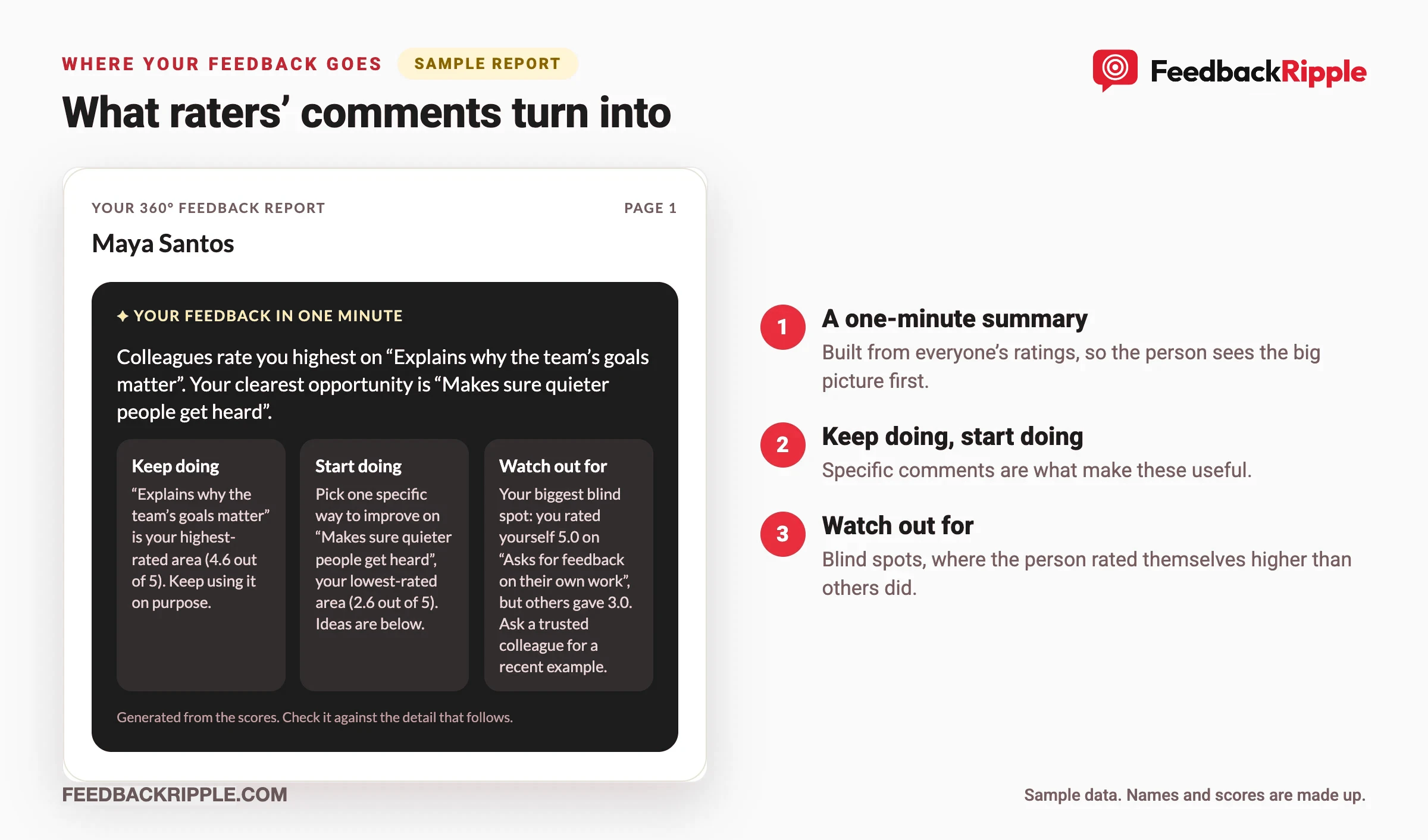
To give you a concrete example, at FeedbackRipple, we don’t simply hand people a pile of scores. The feedback report groups comments into themes, shows where the person sees themselves differently from others, and suggests a few things to try in the next 30 days. In practice, that’s why a specific, honest comment from you genuinely matters: it’s often the line that turns into their development goal.
Here’s what that looks like in a sample FeedbackRipple report. Notice how the “keep doing” and “start doing” boxes come straight from what raters wrote and rated:
FeedbackRipple · First 3 people free
Run a 360 people actually act on
Anonymous by design, in 15 languages, with a report that says what to do next. Your first 3 people are free, no credit card.
The author

Venchito Tampon
Venchito Tampon is the Founder of FeedbackRipple, 360 feedback software that tells people what to do next. It helps executive coaches and HR and L&D teams run anonymous 360s, turn the results into clear guidance and follow through on development plans.
He is a Certified Executive Coach, certified by Symbiosis Coaching, an ICF-accredited coaching organization. He brings that coaching lens to FeedbackRipple: every report ends with clear next steps, not just charts.
He is also the CEO and Founder of eLearning Solutions Lab, a Philippines-based eLearning production company specializing in custom eLearning development and rapid eLearning solutions for global clients.
He founded Rainmakers Training & Consultancy, a corporate training and leadership development firm where he has trained and spoken at 250+ conventions, seminars, and workshops across the Philippines and internationally, including Singapore, Slovakia, and Australia. He has worked with top corporations including SM Hypermarket, Shell, and National Bookstore.
His other ventures include ExpirePilot, document expiration tracking software for small businesses, SharpRocket, a digital marketing and SEO company, and Hills & Valleys Cafe, a local café with available franchising.
He is a certified member of The Philippine Society for Talent Development (PSTD), the premier organization for Talent Development practitioners in the country, and an active Go Negosyo Mentor under the Mentor Me program.