

10 Best Primalogik Alternatives in 2026 (With Real Prices)
10 Best Primalogik Alternatives in 2026 (With Real Prices)
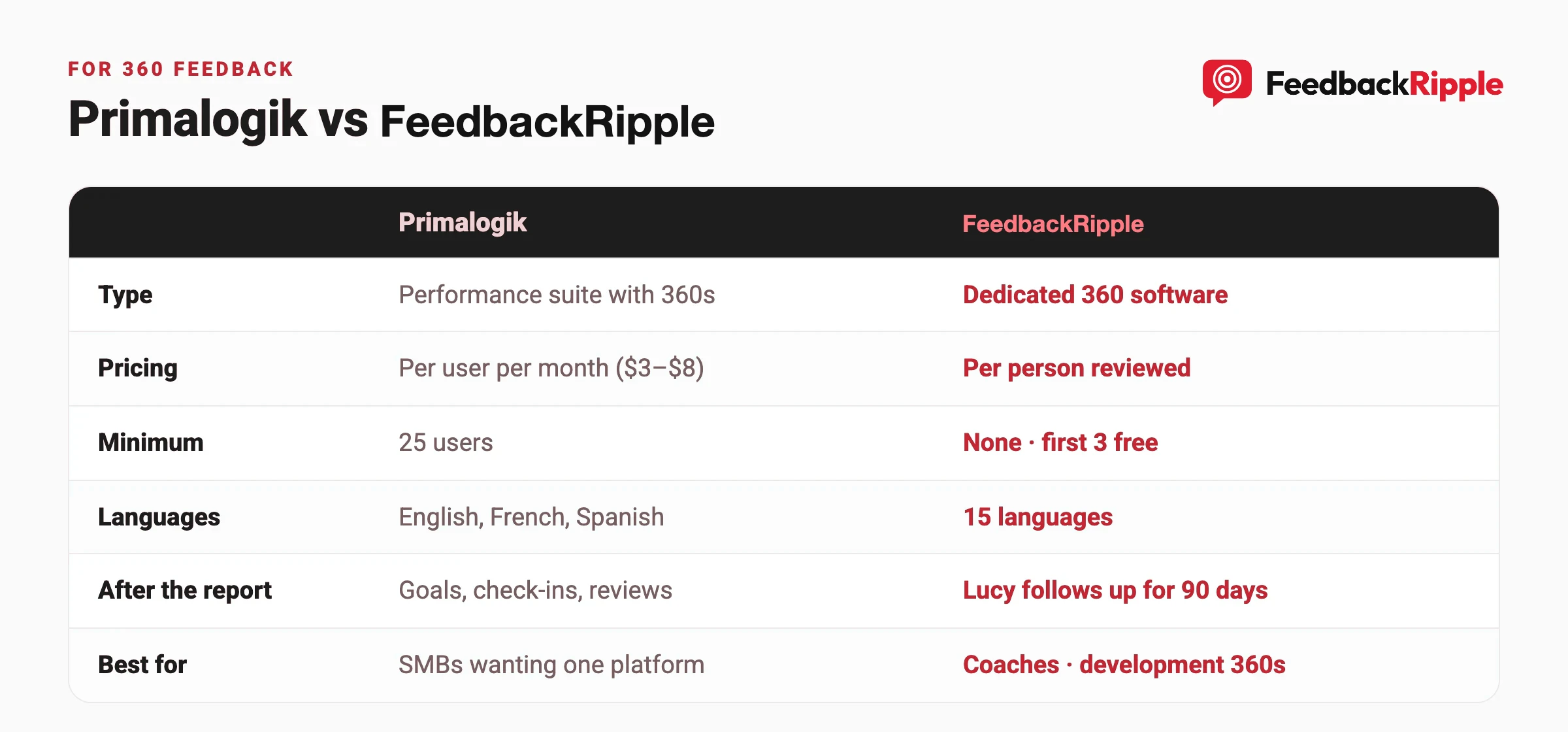
FeedbackRipple is the best Primalogik alternative for coaches and HR teams that mainly run development 360s. Primalogik is a well-rated performance suite at $3–$8 per user a month, but it has a 25-user minimum and three interface languages. FeedbackRipple charges per person reviewed with no minimum, runs surveys in 15 languages, and adds a report with clear next steps and Lucy, an AI coach that follows up for 90 days. Your first 3 people are free, and 12 people a year cost $469.
Primalogik is genuinely good at what it does. It’s a Montreal-based performance platform that brings together 360 feedback, performance reviews, goals and surveys, and it’s rated 4.5 out of 5 on Capterra from 87 reviews. But it’s priced per user with a 25-user minimum, so small teams and coaches pay for seats they don’t really use. And if you mainly want 360s, you’re paying for a whole suite.
So we compared 10 alternatives, from dedicated 360 tools to bigger performance suites, with real prices checked in November 2026. Here’s what we found.
Key takeaways
- FeedbackRipple is our top pick for development 360s: no minimum, 15 languages, next steps in every report and 90-day follow-up, from $49 per person.
- Spidergap and EchoSpan are dedicated 360 tools with 100+ languages, if that’s what you need most.
- Lattice, Culture Amp, Leapsome, 15Five and PerformYard make sense if you want a full performance suite like Primalogik, usually at a higher price.
- Teamflect is free for up to 10 users if you live in Microsoft Teams.
In this guide
- In summary
- How we compared these Primalogik alternatives
- Why teams look for Primalogik alternatives
- The 10 best Primalogik alternatives at a glance
- 1. FeedbackRipple
- 2. EchoSpan
- 3. Culture Amp
- 4. Lattice
- 5. Leapsome
- 6. 15Five
- 7. Qualtrics EmployeeXM
- 8. PerformYard
- 9. Teamflect
- 10. Spidergap
- Feature comparison
- What to look for
- Other alternatives worth a look
- How to switch from Primalogik
- Choose by what you need
In summary
The best Primalogik alternative really depends on what you need it to do better. Our picks by use case:
- FeedbackRipple: Best overall. Dedicated 360s priced per person reviewed, with no seat minimum, AI setup, next steps in every report and 90-day follow-up. First 3 people free, then from $49 per person.
- EchoSpan: Best for configurable global programs. A veteran 360 specialist with 100+ languages and deep options, many as paid add-ons.
- Culture Amp: Best if you also want engagement surveys. 360s inside an engagement and performance platform, priced by quote per employee.
- Lattice: Best for 360s inside performance reviews. Peer feedback as part of review cycles, from $10 per seat a month with a $4,000 minimum.
- Leapsome: Best all-in-one for European teams. Reviews, 360s, learning and goals in one Berlin-based platform.
- 15Five: Best for manager check-ins. 360s as part of weekly check-ins and reviews, $11 per user a month on Perform.
- Qualtrics EmployeeXM: Best for large enterprises. 360 development inside an enterprise listening platform, by quote.
- PerformYard: Best for flexible review processes. Review cycles shaped around how you work, including client feedback.
- Teamflect: Best for Microsoft Teams users. Reviews and 360s inside Teams, free for up to 10 users.
- Spidergap: Best for one-off 360 projects. A dedicated 360 tool with 100+ languages and EU hosting, from $1,099 a year for 10 people.
Disclosure: FeedbackRipple publishes this guide and is one of the tools in it. We put it first because it’s the option we know best for coaches and HR teams, and we list its limits as plainly as everyone else’s. Prices and ratings were checked in November 2026 from vendor pages, Capterra and public price trackers; check the vendor’s own page before you buy.
How we compared these Primalogik alternatives
We looked at each tool the way a Primalogik customer would, on five things:
- Price as you grow: what 12, 30 and 100 people cost in a year, including any minimums
- Free start: a free plan or a real trial
- The report: whether people know what to do after reading it
- Anonymity and languages: how raters are protected, and in how many languages
- Admin effort: setup time, reminders and integrations
Sources are vendor pricing pages, help centers, Capterra and public price trackers, checked in November 2026. Where a vendor only sells by quote, we say so rather than guess. Ratings are Capterra scores.
Why teams look for Primalogik alternatives
Primalogik customers are generally happy with it, especially with its support team. These are the reasons they look around anyway:
The 25-user minimum
Both plans start at 25 users, so a coach with a handful of clients or a 10-person team still pays for 25 seats. In practice, that’s at least about $750 a year on a yearly Feedback plan.
You pay for a suite when you only need 360s
Both plans bundle 360s with reviews, goals and surveys. That’s great value if you use them all, but not if you simply run a leadership 360 once a year.
Three interface languages
Directory listings show English, French and Spanish. If your raters work in other languages, you’ll usually need a tool with wider translation.
Questions about anonymity
At least one reviewer mentions staff repeatedly asking whether their 360 answers were really anonymous. That’s often about communication rather than the tool, but clear minimum group sizes can help.
Tip: Before you switch, list what you’d actually miss about Primalogik, for instance performance reviews or OKRs, and check each alternative against those first.
The 10 best Primalogik alternatives at a glance
| Tool | Best for | Price (Nov 2026) | Capterra rating | Free option |
|---|---|---|---|---|
| FeedbackRipple | Best overall | Free for 3 people, then $49 per person; Team $1,069/yr for 30 | New, not yet rated | Yes, first 3 people |
| EchoSpan | Best for configurable global programs | Calculator; directories from $6/user/mo | 4.9 (76 reviews) | 14-day trial |
| Culture Amp | Best if you also want engagement surveys | Quote; about $4,500/yr minimum (estimate) | 4.6 (157 reviews) | Demo only |
| Lattice | Best for 360s inside performance reviews | $10/seat/mo, $4,000/yr minimum | 4.5 (205 reviews) | Demo only |
| Leapsome | Best all-in-one for European teams | Quote; HRIS base about $7/employee/mo | 4.6 (136 reviews) | 14-day trial |
| 15Five | Best for manager check-ins | $11/user/mo (Perform) | 4.7 (895 reviews) | No |
| Qualtrics EmployeeXM | Best for large enterprises | Quote | Not checked | No |
| PerformYard | Best for flexible review processes | About $5–$10/person/mo (estimates) | 4.7 (187 reviews) | No |
| Teamflect | Best for Microsoft Teams users | Free up to 10 users, then about $7–$14/user/mo | 4.7 (143 reviews) | Yes, up to 10 users |
| Spidergap | Best for one-off 360 projects | $1,099/yr for 10 people | 4.8 (119 reviews) | One free assessment |
Ratings from Capterra, November 2026. “Not checked” means we didn’t find a comparable Capterra listing.
1. FeedbackRipple: Best overall
- Starting price: Free for 3 people, then $49 per person; Team $1,069/yr for 30
- Capterra rating: New, not yet rated
- Free option: Yes, first 3 people
FeedbackRipple is 360 feedback software that tells people what to do next. It was built by a certified executive coach, and its report is built for the debrief: it leads with top strengths and areas to improve, then adds guidance after each part.
It covers the whole journey: AI that drafts the 360, a survey raters finish, a report with clear next steps, and Lucy, an AI coach that follows up for 90 days. You pay per person reviewed, and raters and questions are unlimited.
Why FeedbackRipple is a Primalogik alternative
FeedbackRipple is the best fit if you mainly run 360s rather than full performance reviews. Primalogik prices every user on the platform with a 25-user minimum, while FeedbackRipple charges per person reviewed, with no minimum and your first 3 people free. So a coach reviewing 12 clients pays $469 a year instead of roughly $750–$1,500 for 25 Primalogik seats. You also get 15 survey languages, a report that ends with what to try in the next 30 days, and Lucy’s 90-day follow-up. The trade-off: FeedbackRipple isn’t a performance suite, so if you need reviews, goals and OKRs in the same tool, Primalogik covers more.
To give you a concrete example, at FeedbackRipple, we don’t simply collect ratings and hand back a chart. The report opens with a one-minute summary, shows where someone sees themselves differently from others, and ends with what to try in the next 30 days, so that the debrief has a clear starting point.
Key features
- AI 360 setup: describe a 360 in one sentence and get the questions, raters and deadline drafted for you to check
- A report that says what to do next: top 5 strengths and areas to improve, blind spots, and what to try in the next 30 days
- Anonymity built into the data: answers stored with no link to the rater, groups under 3 merged, confidential mode on by default
- Comment helper for raters: flags comments that could give someone away, with a safer version the rater can choose
- Lucy, a 90-day AI coach: turns the report into a plan and checks in at 30, 60 and 90 days
- Impact survey: colleagues re-rate each goal weeks later, so you can see change
- 15 survey languages, with comments translated into English in the report
- Works with your tools: BambooHR, HiBob, Workday, Slack and Fireflies
Pros
- The only tool here whose report ends in clear next steps and a ready-made plan
- Anonymity rules built into how answers are stored
- Follows up for 90 days with Lucy and an impact survey
- Published prices from $49, first 3 people free, no card
- Usually a third to a half of the price of other dedicated 360 tools
Cons
- 15 survey languages, fewer than Spidergap or EchoSpan
- Hosted in Sydney; no US or EU data location yet
- SAML SSO is on the roadmap
- A newer product with no review-site ratings yet
- Not a full performance suite
Pricing
Free trial: first 3 people, every feature. Pay as you go: $49 per person. Coach: $469 a year for 12 people, then $39 each. Team: $1,069 a year for 30 people, then $29 each. Enterprise: from $5,029 a year for 250 people, then $19 each. Yearly plans can be paid monthly. See pricing. Compared with Primalogik’s Feedback plan on a yearly subscription: 12 people cost $469 vs about $750–$1,500 (25-user minimum), and 30 people $1,069 vs about $900–$1,800. Primalogik also includes performance reviews and goals; FeedbackRipple is 360s only.

FeedbackRipple · First 3 people free
Switch from Primalogik in an afternoon
Bring your questions, upload your raters and run a real 360 with 3 people free. Compare the report with your last Primalogik one.
2. EchoSpan: Best for configurable global programs
- Starting price: Calculator; directories from $6/user/mo
- Capterra rating: 4.9 (76 reviews)
- Free option: 14-day trial
EchoSpan has focused on 360s since 2005 and sells three editions (360 Essentials, Professional and Professional Plus) plus a pay-per-review option. It’s one of the most configurable 360 tools, with many extras sold as add-ons.
Why EchoSpan is a Primalogik alternative
EchoSpan is the pick if you want a dedicated 360 tool with more configuration and languages than Primalogik: 100+ languages, conditional logic, benchmarks and an API on its top edition. Like Primalogik, directories list it per user, from about $6 a month. See FeedbackRipple vs EchoSpan.
Key features
- AI survey generation and a competency library
- 500+ report template options (Professional)
- Conditional logic, benchmarks and an API (Professional Plus)
- AI Insights Toolkit add-on: summaries, action plans, debrief guides
- 100+ languages as an add-on
- SSO and enterprise support as add-ons
Pros
- Highly configurable
- 100+ languages available
- Long 360 track record; 4.9 on Capterra
- Pay-per-review option for consultants
Cons
- Base prices behind a calculator
- AI insights ($44/review), languages ($17/review) and SSO ($1,200/yr) cost extra
- Raters per person capped by edition
Pricing
Base price from its calculator; directories list from about $6 per user a month. Add-ons: Insights Toolkit $44 per review, languages $17 per review, SSO $1,200 a year.
3. Culture Amp: Best if you also want engagement surveys
- Starting price: Quote; about $4,500/yr minimum (estimate)
- Capterra rating: 4.6 (157 reviews)
- Free option: Demo only
Culture Amp, founded in Melbourne in 2011, is best known for engagement surveys and benchmarks. Its Perform module adds performance reviews, 360s, goals and development, with AI Coach and AI comment summaries across the platform.
Why Culture Amp is a Primalogik alternative
Culture Amp is a step up from Primalogik if engagement surveys matter as much as 360s. Both are suites, but Culture Amp is built for larger companies and priced by quote per employee. See FeedbackRipple vs Culture Amp.
Key features
- Individual, Leadership and Manager 360 templates
- Engagement surveys with benchmarks
- Performance reviews, goals and 1-on-1s
- AI Coach and AI comment summaries
- People analytics
Pros
- Engagement, performance and 360s in one place
- Strong benchmarks and analytics
- Established enterprise vendor
Cons
- No published prices
- Priced per employee for the whole company
- More to roll out than a 360-only tool
Pricing
Quote only, per employee and module, billed yearly. A third-party guide estimates a minimum of about $4,500 a year.
4. Lattice: Best for 360s inside performance reviews
- Starting price: $10/seat/mo, $4,000/yr minimum
- Capterra rating: 4.5 (205 reviews)
- Free option: Demo only
Lattice is a San Francisco-based performance platform, founded in 2015, with reviews, goals, 1-on-1s and engagement surveys. Its 360 feedback happens inside performance review cycles, and an AI Agent and analytics come with each product.
Why Lattice is a Primalogik alternative
Lattice covers the same ground as Primalogik’s Performance plan (reviews, goals, 1-on-1s and 360 input) in a larger, more polished platform. Expect to pay more, though: $10 per seat a month with a $4,000 yearly minimum. See FeedbackRipple vs Lattice.
Key features
- Peer and upward feedback inside review cycles
- Goals and OKRs, 1-on-1s and engagement surveys
- AI Agent and analytics included
- Compensation and Grow add-ons
- Many HRIS integrations
Pros
- One platform for reviews, goals and engagement
- Published per-seat prices
- Large user base and many integrations
Cons
- $4,000 yearly minimum
- Pay for every employee, not people reviewed
- 360s tied to review cycles
Pricing
Performance $10 and Foundations $13 per seat per month, billed yearly, with a $4,000 minimum. Engagement $4, Goals $8; Compensation +$6 and Grow +$4.
5. Leapsome: Best all-in-one for European teams
- Starting price: Quote; HRIS base about $7/employee/mo
- Capterra rating: 4.6 (136 reviews)
- Free option: 14-day trial
Leapsome is a Berlin-based people platform that combines reviews and 360s with goals, engagement surveys, learning and 1-on-1s. Its 360s can lead to suggested learning paths, and European buyers like its GDPR-minded approach.
Why Leapsome is a Primalogik alternative
European teams who like Primalogik’s all-in-one approach often shortlist Leapsome for its GDPR-minded design and the link between feedback and learning paths.
Key features
- Reviews and 360s with leadership templates
- Learning paths recommended from feedback
- Goals, surveys and 1-on-1s
- AI copilot and summaries
Pros
- Broad, connected feature set
- Strong fit for European data expectations
- Links feedback to learning
Cons
- Modular per-employee pricing adds up
- One-year minimum contracts
- Heavy if you only want 360s
Pricing
No full price list. Its HRIS foundation was about $7 per employee per month in October 2026, with modules on top.
6. 15Five: Best for manager check-ins
- Starting price: $11/user/mo (Perform)
- Capterra rating: 4.7 (895 reviews)
- Free option: No
15Five is built around weekly check-ins and manager effectiveness. Its Perform plan adds reviews, 360 feedback, goals and career paths, as part of a continuous performance rhythm.
Why 15Five is a Primalogik alternative
If you use Primalogik mainly for check-ins and ongoing feedback, 15Five builds 360s into weekly check-ins and manager coaching, at $11 per user a month on its Perform plan.
Key features
- 360 feedback within performance reviews
- Weekly check-ins, 1-on-1s and recognition
- Manager training on Total Platform
- AI help for reviews
Pros
- Published prices, no seat minimum
- Strong focus on manager habits
- Highly rated: 4.7 from nearly 900 reviews
Cons
- Pay per user for everyone
- 360s aren’t the main focus
- No free plan
Pricing
Engage $4, Perform (with 360s) $11 and Total Platform $16 per user per month, billed yearly.
7. Qualtrics EmployeeXM: Best for large enterprises
- Starting price: Quote
- Capterra rating: Not checked
- Free option: No
Qualtrics is a survey research powerhouse. Its 360 Development offering runs on the same platform as engagement, pulse and lifecycle surveys, built for programs across thousands of people.
Why Qualtrics EmployeeXM is a Primalogik alternative
Companies that outgrow Primalogik and already run Qualtrics for employee surveys can run 360s on the same enterprise platform, with deeper analytics, by quote.
Key features
- 360 development on the same data as engagement surveys
- Advanced analytics and text analysis
- Deep enterprise HR integrations
- Expert frameworks and services
Pros
- Enterprise-grade analytics and security
- Handles very large, global programs
- One platform for all employee listening
Cons
- Quote-only, priced by employee count
- Setup often needs a project team or partner
- Far more than most teams need
Pricing
Quote only, priced by number of employees as part of EmployeeXM.
8. PerformYard: Best for flexible review processes
- Starting price: About $5–$10/person/mo (estimates)
- Capterra rating: 4.7 (187 reviews)
- Free option: No
PerformYard lets HR shape reviews around how the company already works. 360s can include peers, direct reports and even clients, with sign-off routing and reminders.
Why PerformYard is a Primalogik alternative
PerformYard is the closest like-for-like suite: estimated at about $5–$10 per person a month, with review cycles shaped around how you work. It’s a good switch if Primalogik’s review process feels too fixed for your teams.
Key features
- 360, upward, peer and client reviews
- Flexible review cycles with sign-offs
- Goals, check-ins and 9-box reporting
- Optional AI writing help
Pros
- Very flexible review design
- Easy for employees
- Responsive support
Cons
- No public prices or free trial
- Annual minimum
- Light on development guidance
Pricing
Quote. Third-party sources put it at about $5 to $10 per person per month, billed yearly.
9. Teamflect: Best for Microsoft Teams users
- Starting price: Free up to 10 users, then about $7–$14/user/mo
- Capterra rating: 4.7 (143 reviews)
- Free option: Yes, up to 10 users
Teamflect runs reviews, goals, 1-on-1s and 360 feedback inside Microsoft Teams and Outlook, with external and anonymous feedback and AI summaries.
Why Teamflect is a Primalogik alternative
If your company lives in Microsoft Teams and has only a few people to review, Teamflect’s free plan for up to 10 users avoids Primalogik’s 25-user minimum.
Key features
- 360 and instant feedback in Teams chat
- External and anonymous feedback
- Tasks synced with Planner and To Do
- AI feedback summaries
Pros
- Easy adoption for Teams users
- Free for up to 10 users
- Affordable paid plans
Cons
- Much less useful outside Microsoft 365
- Lighter 360 reports
- Prices vary across its pricing page
Pricing
Free for up to 10 users. Paid plans about $7 to $14 per user per month.
10. Spidergap: Best for one-off 360 projects
- Starting price: $1,099/yr for 10 people
- Capterra rating: 4.8 (119 reviews)
- Free option: One free assessment
Spidergap is a UK-based 360 tool, running since 2011 and used by more than 3,500 organizations. Its reports are short and easy to read, it translates surveys into 100+ languages, and it’s ISO 27001 certified with data stored in Europe.
Why Spidergap is a Primalogik alternative
Spidergap suits teams that want a dedicated 360 tool rather than a suite, with 100+ languages and ISO 27001 certification with EU hosting. It’s priced per person reviewed, from $1,099 a year for 10 people, so it works well for a one-off leadership 360 project, though it costs more per person than Primalogik’s per-user plans. See FeedbackRipple vs Spidergap or Spidergap alternatives.
Key features
- Best-practice questionnaire you can customize
- Clear reports with top strengths, areas to improve and a development plan
- Translation into 100+ languages
- Group and comparison reports
- Impact survey to show return on investment
- SSO and self-enrollment on Pro
Pros
- 100+ languages on every plan
- ISO 27001 with EU data hosting
- Proven, readable reports
- 360 experts on hand
Cons
- Starts at $1,099 a year, even for one person
- No AI features on its public pages
- No HR system integrations listed
- No follow-up coaching after the report
Pricing
Starter $1,099 a year for 10 people, then $89 each. Pro $2,199 a year for 10, then $59 each. Enterprise by quote. One free trial assessment.
Feature comparison: Primalogik alternatives side by side
| Tool | Type | Starting price | Free option |
|---|---|---|---|
| FeedbackRipple | Dedicated 360 | Free for 3 people, then $49 per person; Team $1,069/yr for 30 | Yes, first 3 people |
| EchoSpan | Dedicated 360 | Calculator; directories from $6/user/mo | 14-day trial |
| Culture Amp | Engagement + performance suite | Quote; about $4,500/yr minimum (estimate) | Demo only |
| Lattice | Performance suite | $10/seat/mo, $4,000/yr minimum | Demo only |
| Leapsome | All-in-one people platform | Quote; HRIS base about $7/employee/mo | 14-day trial |
| 15Five | Performance + engagement suite | $11/user/mo (Perform) | No |
| Qualtrics EmployeeXM | Enterprise experience platform | Quote | No |
| PerformYard | Performance management | About $5–$10/person/mo (estimates) | No |
| Teamflect | Performance suite in Microsoft Teams | Free up to 10 users, then about $7–$14/user/mo | Yes, up to 10 users |
| Spidergap | Dedicated 360 | $1,099/yr for 10 people | One free assessment |
| Primalogik (for reference) | Performance suite | $3–$8/user/mo, 25-user minimum | Free trial |
What to look for in a Primalogik alternative
- Per-person pricing if you review a subset of people, so you don’t pay for every employee
- A report with next steps, not just scores
- Anonymity rules that merge small groups automatically
- The languages your raters speak
- Data location and certifications your security team needs
- Follow-up after the report, so you can show change
Other Primalogik alternatives worth a look
- Google Forms or SurveyMonkey: free or cheap for one informal 360, if you can handle anonymity and reports by hand. See our comparison.
- G360 Surveys: a dedicated 360 tool listed on Capterra from about $100.
- CheckPoint 360°: a fixed, research-based leadership survey from Wiley, sold through certified partners.
How to switch from Primalogik
Switching is usually simpler than it sounds, given that a 360 doesn’t carry much history. Here’s the order we’d suggest:
- Export your 360 reports and results from Primalogik and keep them for your records.
- List your questionnaire and rating scale, or pick the closest template in the new tool.
- Export your employee and rater lists, or connect your HR system (Primalogik integrates with BambooHR, so check whether your new tool does too).
- Run a pilot 360 with 3 to 5 people.
- Compare the new report with your last Primalogik one, side by side.
- Check your Primalogik billing cycle before you cancel, since yearly plans are paid upfront.
Tip: You don’t have to switch everything. If you still use Primalogik for performance reviews or OKRs, you can keep it for those and run development 360s in a dedicated tool.
Choose a Primalogik alternative by what you need

- Best overall for development 360s: FeedbackRipple
- Coaches, or teams under 25 people: FeedbackRipple
- Many languages and deep configuration: EchoSpan
- One-off 360 projects with 100+ languages: Spidergap
- Engagement surveys too: Culture Amp
- 360s inside performance reviews: Lattice, 15Five or PerformYard
- European all-in-one: Leapsome
- Large enterprise: Qualtrics EmployeeXM
- Microsoft Teams: Teamflect
- One affordable suite for reviews, goals and 360s: stay with Primalogik
And whichever tool you choose, the debrief and follow-up tend to matter more than the platform. Our guides on how to deliver 360 feedback results and 360 degree feedback pros and cons can help.
First 3 people free · No credit card
Run a 360 people actually act on
Anonymous by design, a report that says what to do next, and Lucy to follow up for 90 days. Try every feature with your first 3 people, then pay only for the people you review.
FeedbackRipple is our product, and we’ve ranked it first. Every other tool is described as fairly as we can from public information, checked in November 2026. Product names belong to their owners. Spot something out of date? Email hello@feedbackripple.com.
Keep reading
- What is 360 degree feedback?: meaning, how it works and cost
- 12 best 360 feedback software tools for 2026
- Best Spidergap alternatives


What Is 360 Degree Feedback? Meaning, How It Works, Examples and Cost
What Is 360 Degree Feedback? Meaning, How It Works, Examples and Cost
360 degree feedback is a way of collecting anonymous feedback on someone’s behavior from the people who work around them: their manager, peers, direct reports and sometimes customers, alongside their own self-assessment. The answers are combined into one report that shows how others see the person, where that differs from how they see themselves, and what to work on next. It’s mainly used for development, not for pay decisions.
Key takeaways
- “360” means feedback from all around you: above (manager), beside (peers), below (direct reports) and yourself.
- It’s about behavior, not results. A 360 shows how someone works; a performance review judges what they delivered.
- Anonymity is what makes it honest. Good tools only show a rater group when at least 3 people answer.
- It typically costs from free (DIY forms) to roughly $15–$100 per person with dedicated software, and more when coaching is included.
- Does it work? Research says the survey alone changes little. The debrief, goals and follow-up are what make the difference.
If you’ve just been asked to fill in a “360” for a colleague, or your HR team is thinking about running one, you’ve probably wondered what it actually is. And here’s the thing: most definitions stop at one sentence, but the useful part is understanding how it works, what it costs and whether it’s really worth doing.
So this guide covers all of it, in plain language: who gives feedback, how the process runs step by step, how it differs from a performance review, the pros and cons, example questions and a sample report, typical costs, and what the research says. It’s written for teams in the US, the UK, India and anywhere else.
In this guide
What 360 degree feedback means
The name simply comes from the full circle of people around you at work. Instead of hearing only from your manager, you hear from the people above you, beside you and below you, so that you get a rounded picture of how you come across.
You’ll also see it called multi-rater feedback, multisource feedback, a 360 review or a 360 assessment. They usually mean the same thing. The idea isn’t new either: multi-rater assessment is often traced back to the mid-20th century, and it became a mainstream HR and leadership tool in the 1990s.
A 360 usually focuses on behaviors people can see day to day, for instance how clearly someone communicates, how they make decisions, how they support their team, and how they handle disagreement. It typically doesn’t measure technical skills or sales numbers; other tools do that better.
Who gives feedback in a 360
A typical 360 asks 8 to 12 people to give feedback on one person, grouped by their working relationship:

| Rater group | Who they are | What they tend to see best | Typical number |
|---|---|---|---|
| Self | The person being reviewed | Their own intentions and effort | 1 |
| Manager | Their line manager (sometimes a second one) | Results, priorities, how they handle pressure | 1–2 |
| Peers | Colleagues at a similar level | Collaboration, reliability, communication | 3–5 |
| Direct reports | People who report to them | Leadership, delegation, support, clarity | 3–5 |
| Others | Customers, partners, people in other teams | Service, responsiveness, cross-team work | 0–3 |
Peers and direct reports are usually anonymous, and their answers are only shown as a group. The manager’s answers typically aren’t anonymous, given that there’s only one manager. You can read more about how this works in practice on our anonymous 360 feedback page.
How 360 feedback works, step by step

1. Set up the 360
Decide why you’re running it (development or appraisal), who sees each report, and what you want to ask. Most 360 surveys have 15–30 rating questions on a 1–5 scale plus 2–4 open questions, and take raters 10–15 minutes.
2. Choose and invite raters
The person usually suggests their raters, and their manager or HR checks the list so that it’s balanced, not just friends. Invites go out with a clear deadline, typically about two weeks.
3. Collect the feedback
Everyone answers the same questions, including the person themselves. Reminders go out to people who haven’t answered, and results are only shown for groups with at least three responses, so that nobody can be singled out.
4. Share the report in a debrief
The answers are combined into a report: scores by rater group, the gaps between self and others, and written comments. You have to share it in a private conversation with a manager, HR or a coach, rather than simply emailing it. Our guide on how to deliver 360 feedback results walks through a 60-minute debrief.
5. Set goals and follow up
The person picks one to three things to work on, and checks in at about 30, 60 and 90 days. Many organizations re-run a 360 for the same person every 12 to 18 months, which is long enough for real change to show.
In practice, steps 4 and 5 are where most of the value is. A 360 with no debrief and no follow-up is mostly a survey.
360 feedback vs performance review
People often mix these up, but they do different jobs:
| 360 degree feedback | Performance review | |
|---|---|---|
| Main question | How does this person work with others? | Did this person deliver what was expected? |
| Who gives input | Manager, peers, direct reports, self, others | Mainly the manager |
| Anonymous? | Usually, except the manager | No |
| Focus | Behaviors and skills | Goals, results and ratings |
| Typically used for | Development and coaching | Pay, promotion and performance decisions |
| How often | Every 12–18 months | Once or twice a year |
Some organizations do use 360 results in performance reviews. But it tends to change how people answer: raters soften feedback to protect colleagues, or use it to settle scores. So most experts suggest keeping 360s for development, at least until people really trust the process. If you’re looking at combining the two, our page on 360 performance reviews explains how.
Pros and cons of 360 degree feedback
Here’s the short version. We cover each point in depth, with a fix for every con, in our guide to 360 degree feedback pros and cons.
| Pros | Cons |
|---|---|
| A fuller view than one manager’s opinion | Bias, grudges and office politics |
| Builds self-awareness and reveals blind spots | Takes time from many people |
| Gives quieter people a safe voice | Comments can be vague or harsh |
| Shows clear development priorities | Anonymity can be fragile in small teams |
| Useful team-wide data for training | Little changes without a debrief and follow-up |
Example questions and a sample report
Good 360 questions describe things raters can actually see. Here are a few examples, rated from “strongly disagree” to “strongly agree”:
- Explains the reasons behind decisions.
- Listens to other views before deciding.
- Gives clear priorities when there’s too much to do.
- Gives specific, useful feedback.
- Follows through on commitments.
- Shares credit with the team.
And two open questions that tend to get the most useful answers:
- What should this person keep doing?
- What one thing could they do differently to be more effective?
You’ll find 92 more in our list of 360 feedback questions, and examples of well-written comments in 360 feedback examples. If you’re a rater, our guide on how to give 360 feedback can help too.
What a 360 report looks like
Reports vary a lot by tool. But a good one usually opens with a short summary, then shows scores by rater group, the biggest gaps between self and others, and the written comments. Here’s page one of a sample FeedbackRipple report (sample data, not a real person):
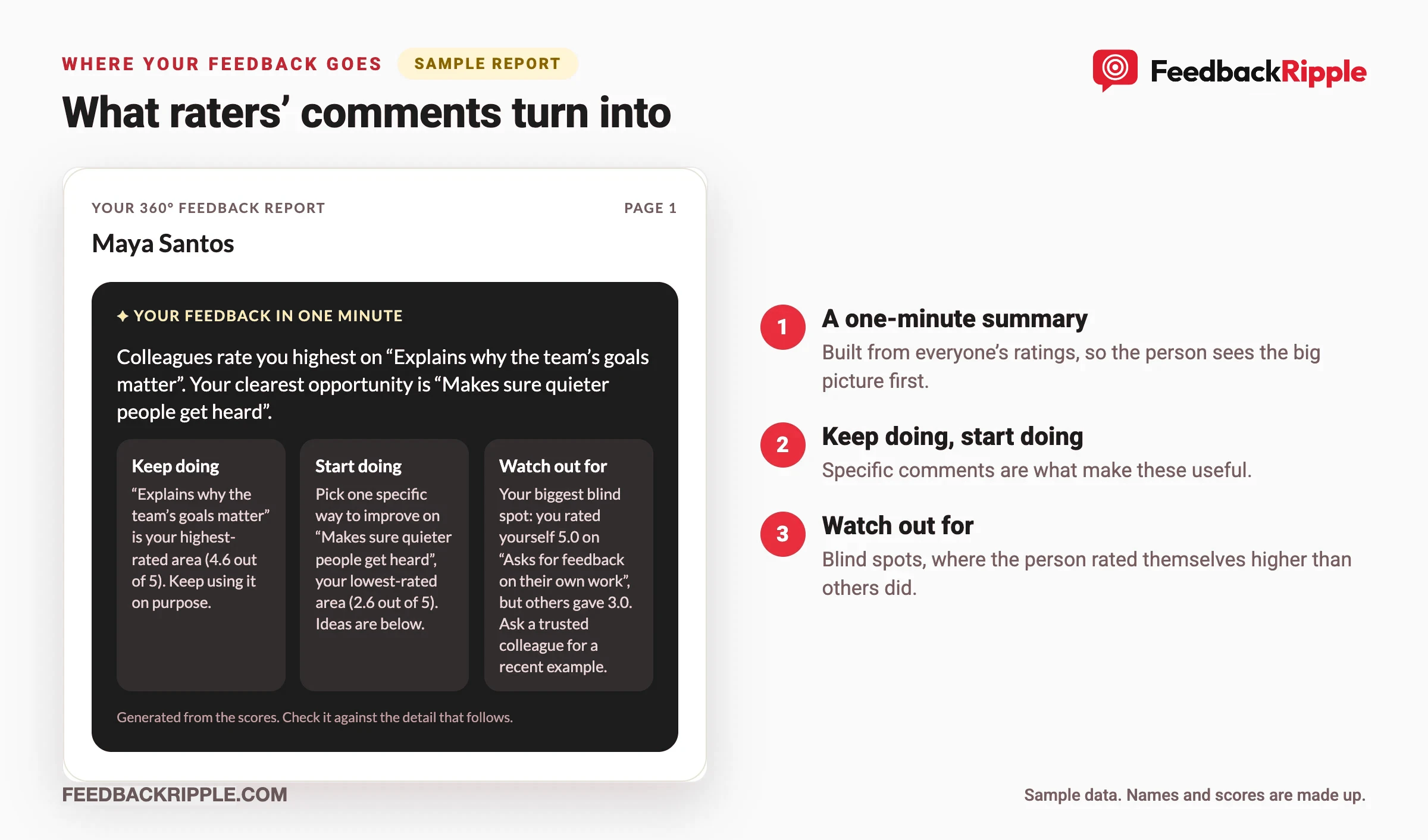
And here’s how the same report compares the person’s own view with their manager, peers and direct reports. This comparison is usually where the most useful conversation starts:

FeedbackRipple · First 3 people free
Get a 360 report that says what to do next
Describe your 360 in one sentence and FeedbackRipple drafts the questions, rater groups and invites. Your first 3 people are free.
How much does a 360 cost?
This is one of the most common questions, and one most guides skip. Costs depend mainly on whether you build it yourself, use dedicated software or include coaching. Here are typical ranges (prices checked in November 2026; they change, so confirm with each vendor):

| Option | Typical cost | What you get | Watch out for |
|---|---|---|---|
| DIY forms (Google Forms, SurveyMonkey) | Free to about $30 per user per month | Basic survey | No rater groups, anonymity rules or 360 report; lots of manual work |
| 360 software, pay per person | About $15–$100 per person | Rater management, anonymity, reports | Per-person prices add up for large rollouts |
| 360 software, annual plans | From a few hundred to a few thousand dollars a year | Many people per year, often admin and reporting tools | Minimum contracts on some platforms |
| Performance suites with 360 | Roughly $4–$25 per employee per month | 360 as part of reviews, goals and engagement | You pay for the whole suite, often with minimums |
| Coach-led 360 | Usually much higher per leader | Software plus interviews or a coached debrief | Price depends mostly on coaching time |
For example, FeedbackRipple costs $49 per person on pay as you go, $469 a year for coaches (12 people), $1,069 a year for teams (30 people) and from $5,029 a year for enterprises, with your first 3 people free. You can see how other tools compare in our list of the best 360 feedback software, and full details on our pricing page.
Who uses 360 feedback?
360s are used by organizations of almost every size and sector, but they tend to show up in a few places:
- Leadership development programs, for new managers, high-potential employees and senior leaders. See our leadership 360 assessment.
- Executive coaches, who often start an engagement with a 360 so that coaching is based on real input. See 360 for executive coaches.
- HR and L&D teams, to find common development needs across a group. See 360 for HR and L&D.
- Healthcare and the public sector, for instance the NHS Leadership Academy in the UK runs its own 360 tool for healthcare leaders.
- Growing companies that want managers to hear honest upward feedback early. See upward feedback.
Is 360 feedback a good idea? What the research says
Honestly, it depends on how it’s run. The best-known review of the research, by Smither, London and Reilly (2005), looked at 24 longitudinal studies and found that improvement after multisource feedback was generally small. And recent surveys show plenty of frustration: in a 2025 LiveCareer survey of 1,000 US workers, reported by SHRM, 48% said 360s amplify office politics.
But the same research shows when 360s work: when the feedback shows a real need to change, people react positively, believe change is possible, set goals and actually act on them. In practice, that means 360 feedback is usually a good idea when:
- It’s used for development, not pay.
- Anonymity is protected (at least 3 responses per group).
- Questions describe behaviors raters can see.
- Every report is followed by a private debrief.
- The person leaves with one to three goals and follow-up dates.
To give you a concrete example, at FeedbackRipple, we don’t simply hand over a chart and hope for the best. Every report ends with things to try in the next 30 days, rater groups under three are merged automatically, and Lucy, our AI coach, follows up for 90 days so that goals don’t quietly fade.
How to get started with 360 feedback
If you’re ready to try it, start small: pick a pilot group of 3 to 10 people, agree that it’s for development, and book debriefs before you send the first invite. You can use our free 360 feedback survey template as a starting point, or try FeedbackRipple free for your first 3 people.
And if you’re on the other side, about to receive your first 360, here’s our advice: read the report once, come back to it a day later, and go into the debrief with questions rather than a defense. It tends to make the whole thing far more useful.
FeedbackRipple · First 3 people free
Run your first 360 free
Anonymous by design, in 15 languages, with a report that tells people what to do next. Your first 3 people are free, no credit card.

360 Degree Feedback Pros and Cons: 8 Advantages, 8 Disadvantages and When It Works
360 Degree Feedback Pros and Cons: 8 Advantages, 8 Disadvantages and When It Works
The main pros of 360 degree feedback are a fuller, less biased view of how someone works, better self-awareness, and a clear picture of what to develop next. The main cons are bias and office politics, the time it takes, feedback that’s vague or hurtful, and very little change when nobody follows up. In short, 360s tend to work well for development, with a debrief and a plan, and tend to backfire when they’re tied to pay or run as a one-off survey. Below you’ll find 8 pros, 8 cons with a fix for each, what the research says, and a quick scorecard to decide if your team is ready.
Key takeaways
- The biggest pro is perspective: people hear from their manager, peers and direct reports, not just one boss.
- The biggest con is trust. In a 2025 survey of 1,000 US workers, 48% said 360s amplify office politics and 39% said they had strained a working relationship.
- Most cons are design problems, so they can usually be fixed: anonymity rules, behavior-based questions, short surveys and a real debrief.
- Use it for development, not pay. Linking 360 results to compensation is where most of the politics comes from.
- Global teams need extra care: rating styles, privacy rules like GDPR and, in some countries, works councils.
Here’s a question HR leads and managers ask all the time: is 360 feedback actually worth it? You can find people who swear by it, and you can find plenty of employees who roll their eyes the moment it’s mentioned. And honestly, both groups have a point.
So this guide doesn’t simply list pros and cons. It explains where each one comes from, how to reduce the risks, and when 360s tend to work versus backfire, so that you can make a real decision for your team, whether you’re in the US or running people across several countries.
In this guide
- Pros and cons at a glance
- 8 pros of 360 degree feedback
- 8 cons, and how to reduce each one
- The most common criticism, and what research says
- Pros and cons for employees vs managers
- Development vs pay decisions
- When 360 feedback works vs backfires
- Pros and cons for global teams
- So, should you use it?
360 degree feedback pros and cons at a glance
360 degree feedback is a way to collect anonymous input on someone’s behavior from the people around them: their manager, peers, direct reports and sometimes customers, plus their own self-assessment (here’s our full guide to what 360 degree feedback is). The result is a report that shows how others see them and where that differs from how they see themselves. Here’s the short version of the trade-offs:
| Pros | Cons |
|---|---|
| A fuller view than one manager’s opinion | Bias, grudges and office politics |
| Builds self-awareness and finds blind spots | Takes time from many people |
| Less dependent on a single manager’s bias | Feedback can be vague, harsh or hard to act on |
| Shows clear development priorities | Anonymity can be fragile in small teams |
| Gives quieter voices a say | People can get defensive or anxious |
| Builds a feedback culture | Little changes without a debrief and follow-up |
| Highlights strengths, not only problems | Problems multiply when tied to pay |
| Gives team-wide training data | Survey fatigue when run too often or too long |

8 pros of 360 degree feedback
1. A fuller picture than one manager can give
A manager typically sees a fraction of how someone works. Peers see how they collaborate, and direct reports see how they lead. So a 360 simply catches things a single reviewer would miss, for instance the manager who presents brilliantly upward but rarely gives their team clear priorities.
2. Better self-awareness
The most useful part of a 360 report is usually the gap between how someone rates themselves and how others rate them. Blind spots (rated higher by yourself than by others) and hidden strengths (rated lower by yourself) tend to start the most honest development conversations.
3. Less dependence on a single person’s bias
Every rater has biases. But when you combine several people across different groups, one person’s opinion carries less weight. That doesn’t remove bias, and we’ll get to that, but it can help balance it out.
4. Clear development priorities
A well-designed 360 shows two or three themes, not 40 scores. That makes it much easier to pick one to three goals and decide what to actually work on next.
5. Quieter voices get heard
Direct reports rarely tell their boss face to face that meetings run over or that decisions feel unclear. Anonymous input gives them a safe way to say it, so that leaders hear things that otherwise never reach them.
6. It builds a feedback culture
When people see feedback handled well (anonymously, respectfully, followed by real change), they tend to get more comfortable giving and asking for feedback day to day. You can help that along by sharing our guide on how to give 360 feedback with raters.
7. Strengths show up too
People often expect a 360 to be a list of problems. But good reports highlight what people are genuinely good at, and building on strengths can be just as valuable as fixing gaps.
8. Useful data for HR and L&D
Across a team or a cohort, 360 results show common themes. For instance, if most new managers score low on delegation, that’s a much better reason to run delegation training than a guess.
FeedbackRipple · First 3 people free
See what a good 360 report looks like
FeedbackRipple reports open with a one-minute summary, then strengths, blind spots and what to try in the next 30 days. Your first 3 people are free.
8 cons of 360 degree feedback, and how to reduce each one
Here’s the honest part. Every one of these cons is real, and every one shows up in the research and in what HR practitioners say online. But in practice, most of them come from how a 360 is set up, not from the idea itself.
1. Bias, grudges and office politics
This is the big one. In a February 2025 LiveCareer survey of 1,000 US workers, reported by SHRM, 79% said they suspect colleagues use feedback to settle personal grudges, and 48% said 360s amplify office politics rather than give honest evaluations.
How to reduce it: keep 360s for development, so that there’s less to gain from gaming them. Let people suggest raters, but have a manager or HR check the list for balance. And ask about behaviors raters have actually seen, not opinions about personality.
2. It takes a lot of time
Ten raters each spending 15 minutes on one person adds up fast, and a company-wide rollout can mean hundreds of surveys in the same month.
How to reduce it: keep surveys to 15–30 rating questions, cap how many surveys any one rater gets, and stagger rollouts by team rather than running everyone at once.
3. Vague, harsh or unusable comments
“Great to work with” doesn’t help anyone. Neither does “Needs to be less difficult.” Most raters have simply never been taught how to write useful feedback.
How to reduce it: add a short prompt to open questions, for instance “Describe one specific moment: what they did and what it led to.” There are plenty of good and bad examples in our 360 feedback examples.
4. Anonymity can be fragile
In a team of four, people can often guess who said what, especially from the way comments are written. And once anonymity feels shaky, honesty usually drops.
How to reduce it: only show a rater group when at least three people answer, and merge smaller groups. Be upfront that the manager’s ratings typically aren’t anonymous. Here’s how we handle anonymity in FeedbackRipple.
5. People get defensive or anxious
Reading critical feedback from colleagues is hard, even when it’s fair. A report emailed without context tends to get skimmed, misread or taken personally.
How to reduce it: never just send the report. Share it a day or two before a private debrief with a manager, HR or a coach. Our guide on how to deliver 360 feedback results has a full 60-minute agenda.
6. Nothing changes afterwards
This is probably the most common complaint from employees: they fill in the surveys, get a PDF, and then nothing happens. So the next 360 feels like a box-ticking exercise.
How to reduce it: end every debrief with one to three goals and book check-ins at 30, 60 and 90 days. People notice change much more when they’ve been told what someone is working on.
7. Problems multiply when it’s tied to pay
Once a 360 can affect someone’s bonus or promotion, raters tend to soften feedback to protect friends, or sharpen it to compete. One HR expert quoted in the SHRM piece described exactly this: people pick friends who will rate them well, and the process becomes political.
How to reduce it: keep it development-only, especially in your first few cycles. More on this below.
8. Survey fatigue
Long surveys, sent too often, get rushed answers in the middle of the scale. And rushed answers make the whole report less useful.
How to reduce it: run 360s every 12 to 18 months per person, keep the survey short, and use our 360 feedback questions to pick only the ones that matter for the role.
The most common criticism of 360 feedback, and what research says
If you ask what the most common criticism is, it usually comes down to two things: people don’t trust the fairness of it, and it doesn’t change much. The survey numbers back up the first part:

The same LiveCareer survey found that 79% of workers would opt out of 360s if they could, and 39% said a 360 had strained a workplace relationship. That’s a lot of frustration with a tool meant to help people grow.
And the second part? The best-known meta-analysis, by Smither, London and Reilly (2005), reviewed 24 longitudinal studies and found that improvement after multisource feedback was generally small. Earlier research on feedback in general, by Kluger and DeNisi (1996), found that while feedback improved performance on average, more than a third of feedback interventions actually made performance worse.
But here’s the part that matters. Smither and colleagues also found when 360s are most likely to work: when the feedback shows a real need to change, people react positively to it, believe change is possible, set goals and actually take action. So the research doesn’t really say 360s don’t work. It says they don’t work on their own.
In other words, a 360 is only as good as the conversation and the follow-up that come after it. The survey is the easy part.
Pros and cons for employees vs managers
The trade-offs look a bit different depending on which side of the report you’re on:
| For employees | For managers and leaders | |
|---|---|---|
| Main pro | A fairer, broader view than one manager’s opinion | Honest upward input they rarely get face to face |
| Second pro | A clear sense of what to work on next | Earlier warning on team problems, like workload or unclear priorities |
| Main con | Worry about grudges and politics | Harder to stay anonymous for managers of small teams |
| Second con | Time spent rating several colleagues | Feedback can feel personal, and more public |
| What helps most | Development-only use and a minimum group of 3 | A private debrief, ideally with a coach or HR |
For managers in particular, a 360 is often the only time their direct reports can speak openly. That’s why we built a dedicated upward feedback option and a guide to 360 reviews for managers.
Development vs pay: where the pros and cons change most
Using 360 results for development or for pay and promotion decisions is the single choice that shifts the balance most. Here’s why:
| Development 360 | 360 used for pay or appraisal | |
|---|---|---|
| How honest raters tend to be | More candid | More cautious, or more political |
| How people react | Curious, more open to change | Defensive, focused on the score |
| Who sees the report | The person and their debrief partner | Also managers and HR, for decisions |
| Main risk | No follow-up, so little changes | Gaming, grudges and legal or fairness concerns |
So our advice is simple: start with development only. If you later want 360 data in appraisals, add it slowly, once people trust the process, and be open about it from day one. Some HR leaders quoted by WorldatWork go further and say 360s shouldn’t affect ratings or pay at all.
When 360 feedback works vs backfires
Most guides stop at the list. But the more useful question is whether a 360 will work in your organization right now. Here’s a quick scorecard:

Quick readiness check
Give yourself one point for each “yes.” With 6 or more, you’re in a good place to run a 360. With 3 or fewer, fix those gaps first, given that a bad 360 can do more harm than no 360 at all.
- We’ve agreed the 360 is for development, and we’ll say so clearly.
- Everyone will know who sees each report before they’re invited.
- Each person will get at least 3 responses per rater group (or groups will be merged).
- Our questions describe behaviors raters can actually see.
- The survey takes 10–15 minutes per rater.
- Every participant will have a private debrief within two weeks.
- Each person will leave with one to three goals and follow-up dates.
- Managers have time (and willingness) to support those goals.
To give you a concrete example, at FeedbackRipple, we don’t simply hand people a survey tool and wish them luck. We built several of these checks into the product: rater groups under three are merged automatically, questions are drafted around the role and focused on behavior, and every report ends with what to try in the next 30 days, so that the debrief has a clear starting point.
FeedbackRipple · First 3 people free
Run a 360 that people trust
Anonymous by design, small groups merged automatically, and a report that says what to do next. Your first 3 people are free, no credit card.
Pros and cons for global teams
Most pros and cons articles are written as if everyone works in one US office. But if your team spans countries, a few things change:
| Typically in the US | Often elsewhere | |
|---|---|---|
| Rating styles | High ratings are common | In some cultures people avoid the extremes of a scale, or rate themselves modestly |
| Upward feedback | Usually accepted | Can feel uncomfortable in more hierarchical cultures, so anonymity matters even more |
| Privacy rules | Mostly state laws and company policy | GDPR in the EU and UK: tell people what you collect, why, for how long, and where it’s stored |
| Employee bodies | Rarely involved | In countries like Germany, works councils often have a say in tools that assess employees |
| Language | One language | People answer more openly in their own language |
In practice, the pros still hold globally, but the cons can get sharper. So compare scores within regions rather than across them, lean on themes and comments more than small score gaps, involve your works council or privacy lead early, and let people answer in their own language. FeedbackRipple runs surveys in 15 languages and translates comments in reports. This isn’t legal advice, so do check local rules with your own legal or privacy team.
So, should you use 360 degree feedback?
Usually, yes, if you use it for development and you’re ready to invest in the debrief and the follow-up. The pros (perspective, self-awareness, clear priorities, a voice for quieter people) are real, and they’re hard to get any other way.
But if your plan is to send a long survey, email the reports and link the scores to bonuses, the cons will most likely win. And it’s worth being honest about that before you start. If you’re ready to try it, our free 360 feedback survey template is a good place to begin, and you can see the full trade-offs between tools in our list of the best 360 feedback software.
FeedbackRipple · First 3 people free
Try a 360 with the pros built in
Describe your 360 in one sentence and FeedbackRipple drafts the questions, rater groups and invites. Lucy, our AI coach, follows up for 90 days. Your first 3 people are free.

How to Give 360 Feedback: 7 Steps With Examples for Peers, Managers and Reports
How to Give 360 Feedback: 7 Steps With Examples for Peers, Managers and Reports
To give good 360 feedback, write about what you’ve actually seen the person do, not who you think they are. Rate only what you’ve observed (use “not observed” for the rest), describe one specific situation for each comment, and give one or two strengths plus one thing that would help them most. Keep it honest but kind, and leave out details that could identify you. Below is a 7-step method, how to adjust it for a peer, your manager or a direct report, and 16 before-and-after examples.
Key takeaways
- Only rate what you’ve seen. “Not observed” is a valid answer, and it keeps guesses out of the person’s averages.
- Use one real moment per comment: the situation, what they did, and what it led to. That’s what makes feedback usable.
- Aim for one or two strengths and one area to improve. More than that usually gets ignored.
- Adjust for the relationship: peers see collaboration, direct reports see management, managers see results and judgment.
- Be candid, especially upward, but stay anonymous-safe: no details that only you would know.
Here’s the thing: most people who search for this aren’t running a 360 program. They’ve just got an email asking them to “share feedback on Alex,” there’s a form with 20 rating questions and a couple of empty comment boxes, and they’re not sure how honest to be. If that’s you, this guide is for you.
And if you’re the one setting up a 360 or sharing the results afterwards, have a look at our guide on how to deliver 360 feedback results, which covers the other side of the conversation.
In this guide
What good 360 feedback looks like
Good 360 feedback is specific, about behavior, and balanced. In practice, that means the person can read your comment and picture the exact moment you mean, and they know what to keep doing or try differently. Two simple frameworks can help:
- SBI (Situation, Behavior, Impact): “In the Monday stand-up (situation), you cut the update short when it went off track (behavior), so we finished on time and got to the blockers (impact).”
- Start, stop, continue: one thing to start doing, one to stop, one to keep. It’s great for the open questions at the end of most 360 forms.
You don’t have to use either one word for word. But if a comment has no real moment and no behavior in it, it’s usually too vague to help.
How to give 360 feedback in 7 steps

1. Read the whole form first
Skim every question before you answer any of them, so that you know what’s coming and don’t repeat yourself. It also helps you spot questions about things you simply haven’t seen.
2. Think back over the last six months
Most of us tend to remember the last two weeks best, which is called recency bias. So take two minutes to jot down three or four moments from the last six months: a project, a meeting, a hand-off. These become your examples.
3. Rate only what you’ve observed
If you haven’t seen someone run a budget or present to the board, choose “not observed.” Guessing really distorts their results, given that your score gets averaged with everyone else’s. There’s more on the rating scale below.
4. Write one or two strengths
Start with what they do well, and make it specific. “Great communicator” feels nice but tells them nothing. “You summarize decisions at the end of every meeting, so nobody leaves confused” tells them exactly what to keep doing.
5. Pick one area that would help them most
Not five. One. Ask yourself: “If they changed one thing, what would make the biggest difference to the people around them?” Then describe a real moment and, if you can, suggest what would help.
6. Adjust for your relationship
A peer, a manager and a direct report see different parts of someone’s work. So focus on what your role actually lets you see. The section below covers each one.
7. Re-read before you submit
Read your comments as if you were the person receiving them. Would you be comfortable saying this to their face, calmly? Could they act on it? Could a detail give away who wrote it? If the answer to any of these is no, edit it.
Tip: Most 360 surveys take 10 to 20 minutes. If you’re rating several people, do them on different days, so that you don’t start copying the same comments across.
How to answer the rating questions
Most 360 forms use a 1–5 scale. The labels vary, but here’s how to think about each number, so that your ratings mean the same thing as everyone else’s:
| Rating | What it usually means | Use it when… |
|---|---|---|
| 5 Strongly agree | A clear, consistent strength | You’d point others to this person as an example |
| 4 Agree | Does this well most of the time | Solid, with the odd exception |
| 3 Neutral | Mixed, or sometimes yes and sometimes no | You’ve seen both, not because you’re unsure |
| 2 Disagree | Noticeably inconsistent | It gets in the way more than occasionally |
| 1 Strongly disagree | A real gap | It regularly causes problems for others |
| N/O Not observed | You haven’t seen it | Always better than a guess |
Three common traps to watch for:
- Middle-of-the-road: giving everything a 3 to stay safe. It tends to hide the real strengths and gaps the person needs to see.
- Halo effect: rating everything high because you like them, or low because of one bad week.
- Grade inflation: giving all 5s. If everything is a strength, nothing is.
FeedbackRipple · First 3 people free
Help raters give better feedback
FeedbackRipple keeps raters anonymous and gives them gentle writing prompts, so that comments come out specific. Your first 3 people are free.
How to give 360 feedback to a peer, your manager or a direct report
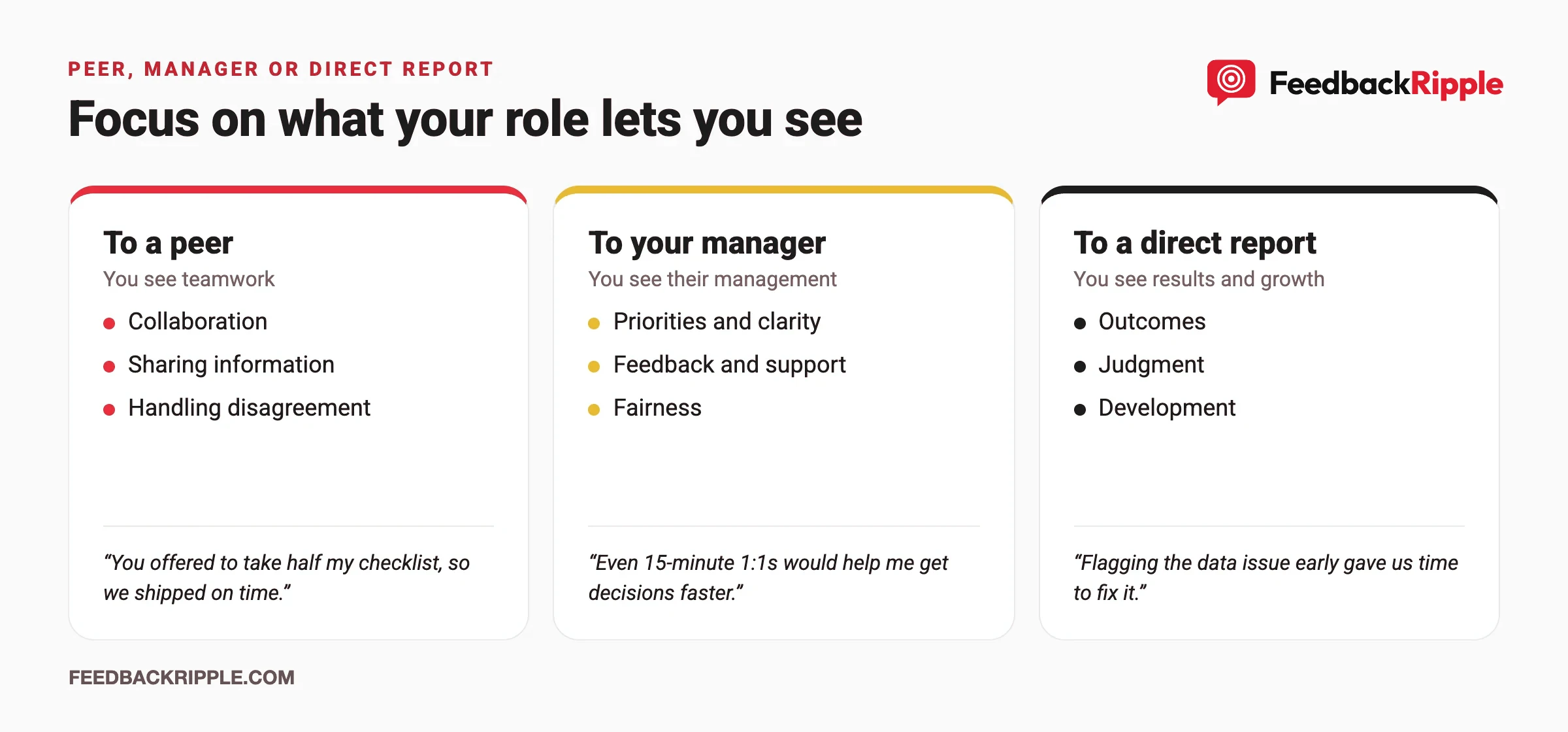
Giving 360 feedback to a peer
Peers usually see how someone works with others day to day. So focus on collaboration, sharing information, reliability and how they handle disagreement. For instance:
- “When we split the launch checklist, you finished your half two days early and offered to take some of mine. That’s why we shipped on time.”
- “In design reviews, you sometimes push back before people finish explaining. Letting them finish first would make the discussion feel more open.”
Giving 360 feedback to your manager (upward feedback)
This is the one people worry about most. But your manager genuinely can’t see how their management feels from the other side, and that’s exactly what you can tell them. Focus on priorities, feedback, support, fairness and communication. Be specific and calm, and frame the improvement as what would help you:
- “You explain why our goals matter before you hand out the work. At the Q3 kickoff, that’s why everyone knew which projects to drop.”
- “In planning meetings, the same two people usually do most of the talking. Asking the quieter ones first would help you hear everyone.”
There are more examples of feedback for your manager in our 360 feedback examples guide, and our page on upward feedback explains how teams keep it safe.
Giving 360 feedback to a direct report
As their manager, you typically see results, judgment and growth over time. So connect your comments to outcomes and development, and remember they may weigh your words more heavily than anyone else’s:
- “You spotted the billing bug in testing and wrote it up with clear steps to reproduce, so engineering fixed it in a day. Keep doing that.”
- “Your updates to leadership start with the background. Opening with your recommendation would get you a decision faster.”
16 examples: weak vs strong 360 feedback
Most weak feedback isn’t unkind. It’s just vague, so the person can’t do anything with it. Here’s how common comments can be rewritten:
| Weak | Strong |
|---|---|
| “Great job this year.” | “The vendor migration finished a month early because you mapped every dependency up front.” |
| “Good communicator.” | “After each sprint review, you post the three decisions we made and who owns each one, so nobody has to ask.” |
| “Needs to be more proactive.” | “Twice this quarter, problems with the release only came up on the day. Flagging them when you first spot them would help.” |
| “Very supportive.” | “When I was new, you walked me through the reporting tool twice without making me feel slow.” |
| “Can be negative.” | “In planning, your first response to new ideas is usually the risks. Starting with what could work would help people stay open.” |
| “Strong leader.” | “You explained why we were changing the roadmap before we heard it elsewhere, which helped me explain it to my team.” |
| “Disorganized.” | “Meeting notes and next steps often arrive days later. Sending them the same day would keep projects moving.” |
| “Team player.” | “When the support queue doubled in March, you took the overnight tickets for a week without being asked.” |
| “Micromanages.” | “You often ask for updates several times a day on tasks that are on track. A daily check-in would give us more room.” |
| “Smart.” | “Your pricing model caught an error in our assumptions that would have cost us a big client.” |
| “Needs to listen more.” | “In the last two retros, you responded before people finished their point. Pausing first would help them feel heard.” |
| “Reliable.” | “If you say you’ll do something in a meeting, it’s usually done by the end of the week.” |
| “Too quiet.” | “You share great ideas with me after meetings. Saying them in the meeting would help the whole team.” |
| “Doesn’t delegate.” | “You kept the client presentation yourself even though Sam had asked for that kind of work. Handing it over would help him grow.” |
| “Good attitude.” | “When the project was canceled, you helped the team move on quickly instead of dwelling on it.” |
| “Should improve time management.” | “The last three reports arrived on the deadline day. Sharing a draft halfway through would let us help sooner.” |
If you want more, there are 122 copy-ready comments in our 360 feedback examples guide.
How candid should you be? (And is it really anonymous?)
Usually more candid than you think. The whole point of a 360 is to show someone things they can’t see on their own, and polite, vague feedback simply doesn’t do that. But candid doesn’t mean harsh: you can be completely honest about a behavior and still be kind about the person.
On anonymity, it depends on the tool and how the 360 is set up, so it’s worth checking. In most 360s:
- Your manager’s ratings are usually not anonymous, given that there’s only one of them.
- Peer and direct-report ratings are grouped, and well-designed tools only show a group’s results when at least three people have answered.
- Comments are typically shown word for word, so your writing style and details can give you away. That’s why it really helps to leave out things only you would know.
You can read how we handle this on our anonymity page. If you’re truly unsure, it’s fine to ask whoever sent the survey how results will be shown before you answer.
Giving 360 feedback across cultures
If your team spans countries, the same comment can land very differently. And given that the person will read it without you there to explain, you have to think a little about how it reads:
- Directness varies. A comment that feels normal in the US or the Netherlands can feel blunt in Japan or Thailand, and a soft UK-style “you might consider…” can be read as optional elsewhere. Describing the behavior and its impact works in both.
- Skip idioms and sports metaphors. “Drop the ball” or “move the goalposts” can confuse people reading in a second language.
- Write short, plain sentences if the person (or you) isn’t writing in their first language. Clear beats clever.
- Be careful with praise levels. In some cultures “good” is high praise; in others it sounds lukewarm. A specific example avoids the guesswork.
FeedbackRipple runs surveys in 15 languages, so raters can usually write in the language they’re most comfortable with.
Mistakes to avoid
- Venting. A 360 isn’t the place to settle a score. If something needs a direct conversation, have it separately.
- Recency bias. Judging six months on the last two weeks.
- Personality labels. “Arrogant,” “lazy,” “negative.” Describe what happened instead.
- Vague praise. “Great job” feels kind but gives them nothing to repeat.
- Hearsay. Only write about what you saw yourself.
- Comments that identify you. “As the only designer on the project…” can undo anonymity in one line.
What happens after you submit
Your answers get combined with everyone else’s into a report, and the person usually goes through it with their manager, HR or a coach. So your comment isn’t the last word; it’s one input into a conversation.
To give you a concrete example, at FeedbackRipple, we don’t simply hand people a pile of scores. The feedback report groups comments into themes, shows where the person sees themselves differently from others, and suggests a few things to try in the next 30 days. In practice, that’s why a specific, honest comment from you genuinely matters: it’s often the line that turns into their development goal.
Here’s what that looks like in a sample FeedbackRipple report. Notice how the “keep doing” and “start doing” boxes come straight from what raters wrote and rated:
FeedbackRipple · First 3 people free
Run a 360 people actually act on
Anonymous by design, in 15 languages, with a report that says what to do next. Your first 3 people are free, no credit card.
9 Best Lattice Alternatives in 2026 (With Real Prices)
9 Best Lattice Alternatives in 2026 (With Real Prices)
FeedbackRipple is the best Lattice alternative for 360 feedback: honest, anonymous 360s for development, a report that says what to try next and Lucy, an AI coach for 90 days, priced per person reviewed from $49 with no $4,000 minimum. If you want a full performance platform instead, 15Five, Leapsome and Culture Amp are the closest matches.
Lattice is one of the most popular performance platforms. But it bills every employee with a $4,000 yearly minimum, it raised prices in July 2026 (Performance from $8 to $10 per seat), and its 360 feedback lives inside review cycles.
We compared 9 alternatives, from dedicated 360 tools to full performance suites, with prices checked in November 2026.
Key takeaways
- FeedbackRipple is our top pick for 360s: anonymous by design, next steps in every report and no per-employee bill.
- 15Five is the closest all-in-one alternative with published prices: $11 per user on Perform, no seat minimum.
- Leapsome and Culture Amp cover reviews plus engagement, by quote.
- Teamflect is free for up to 10 users on Microsoft Teams.
In this guide
- In summary
- How we compared these Lattice alternatives
- Why teams look for Lattice alternatives
- The 9 best Lattice alternatives at a glance
- 1. FeedbackRipple
- 2. 15Five
- 3. Leapsome
- 4. Culture Amp
- 5. PerformYard
- 6. Teamflect
- 7. Qualtrics EmployeeXM
- 8. Spidergap
- 9. EchoSpan
- Feature comparison
- What to look for
- Other alternatives worth a look
- How to switch from Lattice
- Choose by what you need
In summary
The best Lattice alternative depends on what you need it to do better. Our picks by use case:
- FeedbackRipple: Best for 360 feedback. Anonymous development 360s with next steps and 90-day follow-up, from $49 per person, no minimum.
- 15Five: Best all-in-one with published prices. Reviews, 360s, check-ins and engagement, $11 per user on Perform, no minimum.
- Leapsome: Best for European teams. Reviews, 360s, goals and learning in one platform.
- Culture Amp: Best for engagement surveys. Engagement benchmarks plus performance and 360s, by quote.
- PerformYard: Best for flexible review processes. Reviews designed around your process, including client feedback.
- Teamflect: Best for Microsoft Teams users. Reviews, goals and 360s inside Teams, free for up to 10 users.
- Qualtrics EmployeeXM: Best for large enterprises. Enterprise listening and 360 development, by quote.
- Spidergap: Best for leadership 360s in many languages. Dedicated 360s with 100+ languages, from $1,099 a year.
- EchoSpan: Best for configurable 360 programs. Highly configurable dedicated 360s.
Disclosure: FeedbackRipple publishes this guide and is one of the tools in it. We put it first because it’s the option we know best for coaches and HR teams, and we list its limits as plainly as everyone else’s. Prices and ratings were checked in November 2026 from vendor pages, Capterra and public price trackers; check the vendor’s own page before you buy.
How we compared these Lattice alternatives
We looked at each tool the way a Lattice customer would, on five things:
- Price model: per employee vs per person reviewed, and minimums
- Scope: reviews and goals, or 360s only
- 360 quality: anonymity and a report people can act on
- Integrations
- Admin effort
Sources are vendor pricing pages, help centers, Capterra and public price trackers, checked in November 2026. Where a vendor only sells by quote, we say so rather than guess. Ratings are Capterra scores.
Why teams look for Lattice alternatives
Lattice is well liked, with a 4.5 on Capterra. These are the reasons teams look at alternatives:
A $4,000 minimum
Small companies pay at least $4,000 a year, even if seats would cost less.
Prices went up in 2026
Foundations rose from $11 to $13 per seat and Performance from $8 to $10 in July 2026.
360s live inside review cycles
When feedback feeds ratings and pay, raters tend to soften it. Teams that want honest development 360s often run them separately.
You pay for every employee
Running 360s for 30 managers means paying for every seat on the module.
Tip: If you’re happy with Lattice for reviews and goals, you may not need to switch at all. Adding a dedicated 360 tool for development is often cheaper than moving platforms.
The 9 best Lattice alternatives at a glance
| Tool | Best for | Price (Nov 2026) | Capterra rating | Free option |
|---|---|---|---|---|
| FeedbackRipple | Best for 360 feedback | Free for 3 people, then $49 per person; Team $1,069/yr for 30 | New, not yet rated | Yes, first 3 people |
| 15Five | Best all-in-one with published prices | $11/user/mo (Perform) | 4.7 (895 reviews) | No |
| Leapsome | Best for European teams | Quote; HRIS base about $7/employee/mo | 4.6 (136 reviews) | 14-day trial |
| Culture Amp | Best for engagement surveys | Quote; about $4,500/yr minimum (estimate) | 4.6 (157 reviews) | Demo only |
| PerformYard | Best for flexible review processes | About $5–$10/person/mo (estimates) | 4.7 (187 reviews) | No |
| Teamflect | Best for Microsoft Teams users | Free up to 10 users, then about $7–$14/user/mo | 4.7 (143 reviews) | Yes, up to 10 users |
| Qualtrics EmployeeXM | Best for large enterprises | Quote | Not checked | No |
| Spidergap | Best for leadership 360s in many languages | $1,099/yr for 10 people | 4.8 (119 reviews) | One free assessment |
| EchoSpan | Best for configurable 360 programs | Calculator; directories from $6/user/mo | 4.9 (76 reviews) | 14-day trial |
Ratings from Capterra, November 2026. “Not checked” means we didn’t find a comparable Capterra listing.
1. FeedbackRipple: Best for 360 feedback
- Starting price: Free for 3 people, then $49 per person; Team $1,069/yr for 30
- Capterra rating: New, not yet rated
- Free option: Yes, first 3 people
FeedbackRipple is 360 feedback software that tells people what to do next. Built by a certified executive coach, it runs standalone 360s for development, whenever someone needs one.
AI drafts each 360, raters stay anonymous by design, the report gives clear next steps, and Lucy, an AI coach, follows up for 90 days. You pay only for the people you review, with no minimum.
Why FeedbackRipple is a Lattice alternative
FeedbackRipple replaces Lattice’s 360 feedback, or sits next to Lattice reviews. It keeps 360s for development, apart from ratings, which keeps feedback honest, and protects raters by design. For 30 managers in a 200-person company, FeedbackRipple’s Team plan is $1,069 a year, while Lattice Performance lists at $24,000 for 200 seats, though that also covers reviews for everyone.
Key features
- AI 360 setup: describe a 360 in one sentence and get the questions, raters and deadline drafted for you to check
- A report that says what to do next: top 5 strengths and areas to improve, blind spots, and what to try in the next 30 days
- Anonymity built into the data: answers stored with no link to the rater, groups under 3 merged, confidential mode on by default
- Comment helper for raters: flags comments that could give someone away, with a safer version the rater can choose
- Lucy, a 90-day AI coach: turns the report into a plan and checks in at 30, 60 and 90 days
- Impact survey: colleagues re-rate each goal weeks later, so you can see change
- 15 survey languages, with comments translated into English in the report
- Works with your tools: BambooHR, HiBob, Workday, Slack and Fireflies
Pros
- The only tool here whose report ends in clear next steps and a ready-made plan
- Anonymity rules built into how answers are stored
- Follows up for 90 days with Lucy and an impact survey
- Published prices from $49, first 3 people free, no card
- Usually a third to a half of the price of other dedicated 360 tools
Cons
- 15 survey languages, fewer than Spidergap or EchoSpan
- Hosted in Sydney; no US or EU data location yet
- SAML SSO is on the roadmap
- A newer product with no review-site ratings yet
- Not a full performance suite
Pricing
Free trial: first 3 people, every feature. Pay as you go: $49 per person. Coach: $469 a year for 12 people, then $39 each. Team: $1,069 a year for 30 people, then $29 each. Enterprise: from $5,029 a year for 250 people, then $19 each. Yearly plans can be paid monthly. See pricing. Compared with Lattice Performance: 10 leaders in a 30-person company cost $490 vs Lattice’s $4,000 minimum, and 120 managers in a 1,000-person company $3,679 vs $120,000 for every seat.
FeedbackRipple · First 3 people free
Better 360s, next to your review tool
Keep Lattice for reviews and run development 360s in FeedbackRipple. Try it with 3 people, no card, no time limit.
2. 15Five: Best all-in-one with published prices
- Starting price: $11/user/mo (Perform)
- Capterra rating: 4.7 (895 reviews)
- Free option: No
15Five is built around weekly check-ins and manager effectiveness. Its Perform plan adds reviews, 360 feedback, goals and career paths, as part of a continuous performance rhythm.
Why 15Five is a Lattice alternative
15Five offers much of what Lattice does, with published prices and no seat minimum, and a stronger focus on manager habits and weekly check-ins.
Key features
- 360 feedback within performance reviews
- Weekly check-ins, 1-on-1s and recognition
- Manager training on Total Platform
- AI help for reviews
Pros
- Published prices, no seat minimum
- Strong focus on manager habits
- Highly rated: 4.7 from nearly 900 reviews
Cons
- Pay per user for everyone
- 360s aren’t the main focus
- No free plan
Pricing
Engage $4, Perform (with 360s) $11 and Total Platform $16 per user per month, billed yearly.
3. Leapsome: Best for European teams
- Starting price: Quote; HRIS base about $7/employee/mo
- Capterra rating: 4.6 (136 reviews)
- Free option: 14-day trial
Leapsome is a Berlin-based people platform that combines reviews and 360s with goals, engagement surveys, learning and 1-on-1s. Its 360s can lead to suggested learning paths, and European buyers like its GDPR-minded approach.
Why Leapsome is a Lattice alternative
Leapsome matches Lattice’s scope and links feedback to learning paths, with a GDPR-minded approach that suits European companies.
Key features
- Reviews and 360s with leadership templates
- Learning paths recommended from feedback
- Goals, surveys and 1-on-1s
- AI copilot and summaries
Pros
- Broad, connected feature set
- Strong fit for European data expectations
- Links feedback to learning
Cons
- Modular per-employee pricing adds up
- One-year minimum contracts
- Heavy if you only want 360s
Pricing
No full price list. Its HRIS foundation was about $7 per employee per month in October 2026, with modules on top.
4. Culture Amp: Best for engagement surveys
- Starting price: Quote; about $4,500/yr minimum (estimate)
- Capterra rating: 4.6 (157 reviews)
- Free option: Demo only
Culture Amp, founded in Melbourne in 2011, is best known for engagement surveys and benchmarks. Its Perform module adds performance reviews, 360s, goals and development, with AI Coach and AI comment summaries across the platform.
Why Culture Amp is a Lattice alternative
If engagement surveys matter more to you than goals, Culture Amp’s benchmarks are among the strongest, with reviews and 360s in its Perform module. See FeedbackRipple vs Culture Amp.
Key features
- Individual, Leadership and Manager 360 templates
- Engagement surveys with benchmarks
- Performance reviews, goals and 1-on-1s
- AI Coach and AI comment summaries
- People analytics
Pros
- Engagement, performance and 360s in one place
- Strong benchmarks and analytics
- Established enterprise vendor
Cons
- No published prices
- Priced per employee for the whole company
- More to roll out than a 360-only tool
Pricing
Quote only, per employee and module, billed yearly. A third-party guide estimates a minimum of about $4,500 a year.
5. PerformYard: Best for flexible review processes
- Starting price: About $5–$10/person/mo (estimates)
- Capterra rating: 4.7 (187 reviews)
- Free option: No
PerformYard lets HR shape reviews around how the company already works. 360s can include peers, direct reports and even clients, with sign-off routing and reminders.
Why PerformYard is a Lattice alternative
PerformYard is a simpler, flexible alternative for HR teams that mainly need reviews and 360s without Lattice’s broader platform.
Key features
- 360, upward, peer and client reviews
- Flexible review cycles with sign-offs
- Goals, check-ins and 9-box reporting
- Optional AI writing help
Pros
- Very flexible review design
- Easy for employees
- Responsive support
Cons
- No public prices or free trial
- Annual minimum
- Light on development guidance
Pricing
Quote. Third-party sources put it at about $5 to $10 per person per month, billed yearly.
6. Teamflect: Best for Microsoft Teams users
- Starting price: Free up to 10 users, then about $7–$14/user/mo
- Capterra rating: 4.7 (143 reviews)
- Free option: Yes, up to 10 users
Teamflect runs reviews, goals, 1-on-1s and 360 feedback inside Microsoft Teams and Outlook, with external and anonymous feedback and AI summaries.
Why Teamflect is a Lattice alternative
For Microsoft 365 companies, Teamflect runs reviews, goals and 360s inside Teams with no $4,000 minimum.
Key features
- 360 and instant feedback in Teams chat
- External and anonymous feedback
- Tasks synced with Planner and To Do
- AI feedback summaries
Pros
- Easy adoption for Teams users
- Free for up to 10 users
- Affordable paid plans
Cons
- Much less useful outside Microsoft 365
- Lighter 360 reports
- Prices vary across its pricing page
Pricing
Free for up to 10 users. Paid plans about $7 to $14 per user per month.
7. Qualtrics EmployeeXM: Best for large enterprises
- Starting price: Quote
- Capterra rating: Not checked
- Free option: No
Qualtrics is a survey research powerhouse. Its 360 Development offering runs on the same platform as engagement, pulse and lifecycle surveys, built for programs across thousands of people.
Why Qualtrics EmployeeXM is a Lattice alternative
Large companies that need deeper analytics than Lattice offers can run 360s and engagement on Qualtrics.
Key features
- 360 development on the same data as engagement surveys
- Advanced analytics and text analysis
- Deep enterprise HR integrations
- Expert frameworks and services
Pros
- Enterprise-grade analytics and security
- Handles very large, global programs
- One platform for all employee listening
Cons
- Quote-only, priced by employee count
- Setup often needs a project team or partner
- Far more than most teams need
Pricing
Quote only, priced by number of employees as part of EmployeeXM.
8. Spidergap: Best for leadership 360s in many languages
- Starting price: $1,099/yr for 10 people
- Capterra rating: 4.8 (119 reviews)
- Free option: One free assessment
Spidergap is a UK-based 360 tool, running since 2011 and used by more than 3,500 organizations. Its reports are short and easy to read, it translates surveys into 100+ languages, and it’s ISO 27001 certified with data stored in Europe.
Why Spidergap is a Lattice alternative
If you used Lattice mainly for leadership 360s across countries, Spidergap is a dedicated 360 tool with 100+ languages, priced per person reviewed. See FeedbackRipple vs Spidergap.
Key features
- Best-practice questionnaire you can customize
- Clear reports with top strengths, areas to improve and a development plan
- Translation into 100+ languages
- Group and comparison reports
- Impact survey to show return on investment
- SSO and self-enrollment on Pro
Pros
- 100+ languages on every plan
- ISO 27001 with EU data hosting
- Proven, readable reports
- 360 experts on hand
Cons
- Starts at $1,099 a year, even for one person
- No AI features on its public pages
- No HR system integrations listed
- No follow-up coaching after the report
Pricing
Starter $1,099 a year for 10 people, then $89 each. Pro $2,199 a year for 10, then $59 each. Enterprise by quote. One free trial assessment.
9. EchoSpan: Best for configurable 360 programs
- Starting price: Calculator; directories from $6/user/mo
- Capterra rating: 4.9 (76 reviews)
- Free option: 14-day trial
EchoSpan has focused on 360s since 2005 and sells three editions (360 Essentials, Professional and Professional Plus) plus a pay-per-review option. It’s one of the most configurable 360 tools, with many extras sold as add-ons.
Why EchoSpan is a Lattice alternative
EchoSpan suits complex 360 programs that need conditional logic and many report options, outside of review cycles. See FeedbackRipple vs EchoSpan.
Key features
- AI survey generation and a competency library
- 500+ report template options (Professional)
- Conditional logic, benchmarks and an API (Professional Plus)
- AI Insights Toolkit add-on: summaries, action plans, debrief guides
- 100+ languages as an add-on
- SSO and enterprise support as add-ons
Pros
- Highly configurable
- 100+ languages available
- Long 360 track record; 4.9 on Capterra
- Pay-per-review option for consultants
Cons
- Base prices behind a calculator
- AI insights ($44/review), languages ($17/review) and SSO ($1,200/yr) cost extra
- Raters per person capped by edition
Pricing
Base price from its calculator; directories list from about $6 per user a month. Add-ons: Insights Toolkit $44 per review, languages $17 per review, SSO $1,200 a year.
Feature comparison: Lattice alternatives side by side
| Tool | Type | Starting price | Free option |
|---|---|---|---|
| FeedbackRipple | Dedicated 360 | Free for 3 people, then $49 per person; Team $1,069/yr for 30 | Yes, first 3 people |
| 15Five | Performance + engagement suite | $11/user/mo (Perform) | No |
| Leapsome | All-in-one people platform | Quote; HRIS base about $7/employee/mo | 14-day trial |
| Culture Amp | Engagement + performance suite | Quote; about $4,500/yr minimum (estimate) | Demo only |
| PerformYard | Performance management | About $5–$10/person/mo (estimates) | No |
| Teamflect | Performance suite in Microsoft Teams | Free up to 10 users, then about $7–$14/user/mo | Yes, up to 10 users |
| Qualtrics EmployeeXM | Enterprise experience platform | Quote | No |
| Spidergap | Dedicated 360 | $1,099/yr for 10 people | One free assessment |
| EchoSpan | Dedicated 360 | Calculator; directories from $6/user/mo | 14-day trial |
What to look for in a Lattice alternative
- No minimum, or one that fits your size
- Published prices
- 360s kept for development, if honesty matters most
- Anonymity rules that are always on
- Integrations with your HRIS and chat tools
- What you’d lose from Lattice: goals, 1-on-1s, compensation
Other Lattice alternatives worth a look
- Keep Lattice and add a 360 tool for development 360s.
- CheckPoint 360°: a fixed leadership survey from Wiley, run through partners.
- Google Forms or SurveyMonkey for one informal 360. See our comparison.
How to switch from Lattice
- List which Lattice products you use (Performance, Goals, Engagement, Grow, Compensation).
- Export reviews, goals and feedback history before your contract ends.
- Decide whether to replace everything or only 360s.
- Connect your HRIS to the new tool.
- Run a pilot review or 360 with a small group.
- Time the switch to your Lattice renewal.
Tip: Lattice bills annually. Start your pilot two to three months before renewal.
Choose a Lattice alternative by what you need
- Best for 360 feedback: FeedbackRipple
- All-in-one with published prices: 15Five
- European all-in-one: Leapsome
- Engagement surveys: Culture Amp
- Flexible reviews: PerformYard
- Microsoft Teams: Teamflect
- Large enterprise: Qualtrics EmployeeXM
First 3 people free · No credit card
Run a 360 people actually act on
Anonymous by design, a report that says what to do next, and Lucy to follow up for 90 days. Try every feature with your first 3 people, then pay only for the people you review.
FeedbackRipple is our product, and we’ve ranked it first. Every other tool is described as fairly as we can from public information, checked in November 2026. Product names belong to their owners. Spot something out of date? Email hello@feedbackripple.com.
Keep reading
9 Best Culture Amp Alternatives in 2026 (With Real Prices)
9 Best Culture Amp Alternatives in 2026 (With Real Prices)
FeedbackRipple is the best Culture Amp alternative if 360 feedback is what you need: it does that one job in depth and you pay only for the people you review, from $49, instead of a company-wide contract. If you want a full performance platform instead, Lattice and Leapsome are the closest matches, and 15Five is the best-rated option for manager check-ins.
Culture Amp is a strong platform, especially for engagement surveys. But it doesn’t publish prices, it’s quoted for your whole headcount, and if you mainly need development 360s for managers you may be paying for much more than you use.
We compared 9 alternatives, from dedicated 360 tools to full performance suites, with prices checked in November 2026.
Key takeaways
- FeedbackRipple is our top pick for 360s: AI setup, next steps in every report and 90-day follow-up, priced per person reviewed.
- Lattice ($10 per seat, $4,000 minimum), Leapsome and 15Five ($11 per user on Perform) are the closest all-in-one replacements.
- Qualtrics is the enterprise option for company-wide listening.
- Many companies keep their engagement tool and add a dedicated 360 tool.
In this guide
- In summary
- How we compared these Culture Amp alternatives
- Why teams look for Culture Amp alternatives
- The 9 best Culture Amp alternatives at a glance
- 1. FeedbackRipple
- 2. Lattice
- 3. Leapsome
- 4. 15Five
- 5. Qualtrics EmployeeXM
- 6. PerformYard
- 7. Teamflect
- 8. Spidergap
- 9. EchoSpan
- Feature comparison
- What to look for
- Other alternatives worth a look
- How to switch from Culture Amp
- Choose by what you need
In summary
The best Culture Amp alternative depends on what you need it to do better. Our picks by use case:
- FeedbackRipple: Best for 360 feedback. Dedicated 360s with AI setup, next steps and 90-day follow-up, priced per person reviewed from $49.
- Lattice: Best all-in-one replacement. Reviews, goals, 1-on-1s and engagement, with published per-seat prices.
- Leapsome: Best for European teams. Reviews, 360s, learning and surveys in one Berlin-based platform.
- 15Five: Best for manager check-ins. Engagement and performance with weekly check-ins, from $4 per user.
- Qualtrics EmployeeXM: Best for large enterprises. Enterprise employee listening and 360 development, by quote.
- PerformYard: Best for flexible review processes. Reviews and 360s shaped around how you already work.
- Teamflect: Best for Microsoft Teams users. Reviews and 360s inside Teams, free for up to 10 users.
- Spidergap: Best for leadership 360s in many languages. A dedicated 360 tool with 100+ languages, from $1,099 a year.
- EchoSpan: Best for configurable 360 programs. Highly configurable 360s with add-ons for languages and AI.
Disclosure: FeedbackRipple publishes this guide and is one of the tools in it. We put it first because it’s the option we know best for coaches and HR teams, and we list its limits as plainly as everyone else’s. Prices and ratings were checked in November 2026 from vendor pages, Capterra and public price trackers; check the vendor’s own page before you buy.
How we compared these Culture Amp alternatives
We looked at each tool the way a Culture Amp customer would, on five things:
- Price model: per employee vs per person reviewed, and whether prices are published
- Scope: 360s only, or reviews, goals and engagement too
- The 360 report: whether people know what to do next
- Anonymity for raters
- Admin effort: how long it takes to roll out
Sources are vendor pricing pages, help centers, Capterra and public price trackers, checked in November 2026. Where a vendor only sells by quote, we say so rather than guess. Ratings are Capterra scores.
Why teams look for Culture Amp alternatives
Culture Amp has loyal customers, especially for engagement. These are the reasons teams look at alternatives:
No published prices
Culture Amp sells by quote, per employee and module. A third-party guide estimates a minimum of about $4,500 a year.
You pay for everyone
If you only need 360s for 30 managers, you still pay for your whole headcount.
Running a 360 can mean extra setup
Some reviewers say a 360 needs separate peer, upward and self-reflection reviews run together.
More platform than a small team needs
Coaches and small HR teams often only need excellent 360s, not a full employee experience platform.
Tip: Decide first whether you need a full platform or just 360s. That one choice halves your shortlist.
The 9 best Culture Amp alternatives at a glance
| Tool | Best for | Price (Nov 2026) | Capterra rating | Free option |
|---|---|---|---|---|
| FeedbackRipple | Best for 360 feedback | Free for 3 people, then $49 per person; Team $1,069/yr for 30 | New, not yet rated | Yes, first 3 people |
| Lattice | Best all-in-one replacement | $10/seat/mo, $4,000/yr minimum | 4.5 (205 reviews) | Demo only |
| Leapsome | Best for European teams | Quote; HRIS base about $7/employee/mo | 4.6 (136 reviews) | 14-day trial |
| 15Five | Best for manager check-ins | $11/user/mo (Perform) | 4.7 (895 reviews) | No |
| Qualtrics EmployeeXM | Best for large enterprises | Quote | Not checked | No |
| PerformYard | Best for flexible review processes | About $5–$10/person/mo (estimates) | 4.7 (187 reviews) | No |
| Teamflect | Best for Microsoft Teams users | Free up to 10 users, then about $7–$14/user/mo | 4.7 (143 reviews) | Yes, up to 10 users |
| Spidergap | Best for leadership 360s in many languages | $1,099/yr for 10 people | 4.8 (119 reviews) | One free assessment |
| EchoSpan | Best for configurable 360 programs | Calculator; directories from $6/user/mo | 4.9 (76 reviews) | 14-day trial |
Ratings from Capterra, November 2026. “Not checked” means we didn’t find a comparable Capterra listing.
1. FeedbackRipple: Best for 360 feedback
- Starting price: Free for 3 people, then $49 per person; Team $1,069/yr for 30
- Capterra rating: New, not yet rated
- Free option: Yes, first 3 people
FeedbackRipple is 360 feedback software that tells people what to do next. Built by a certified executive coach, it focuses on one job and does it in depth.
AI drafts each 360, raters stay anonymous by design, the report gives clear next steps, and Lucy, an AI coach, follows up for 90 days. You pay only for the people you review.
Why FeedbackRipple is a Culture Amp alternative
FeedbackRipple replaces the 360 part of Culture Amp without a platform contract. Reviewing 30 managers in a 200-person company costs $1,069 a year on the Team plan, rather than a quote for 200 employees. It goes deeper on the 360 itself: a 360 drafted from one sentence, anonymity built into how answers are stored, guidance on what to try in the next 30 days and Lucy’s 90-day check-ins. It doesn’t run engagement surveys or performance ratings, so pair it with your engagement tool if you need both.
Key features
- AI 360 setup: describe a 360 in one sentence and get the questions, raters and deadline drafted for you to check
- A report that says what to do next: top 5 strengths and areas to improve, blind spots, and what to try in the next 30 days
- Anonymity built into the data: answers stored with no link to the rater, groups under 3 merged, confidential mode on by default
- Comment helper for raters: flags comments that could give someone away, with a safer version the rater can choose
- Lucy, a 90-day AI coach: turns the report into a plan and checks in at 30, 60 and 90 days
- Impact survey: colleagues re-rate each goal weeks later, so you can see change
- 15 survey languages, with comments translated into English in the report
- Works with your tools: BambooHR, HiBob, Workday, Slack and Fireflies
Pros
- The only tool here whose report ends in clear next steps and a ready-made plan
- Anonymity rules built into how answers are stored
- Follows up for 90 days with Lucy and an impact survey
- Published prices from $49, first 3 people free, no card
- Usually a third to a half of the price of other dedicated 360 tools
Cons
- 15 survey languages, fewer than Spidergap or EchoSpan
- Hosted in Sydney; no US or EU data location yet
- SAML SSO is on the roadmap
- A newer product with no review-site ratings yet
- Not a full performance suite
Pricing
Free trial: first 3 people, every feature. Pay as you go: $49 per person. Coach: $469 a year for 12 people, then $39 each. Team: $1,069 a year for 30 people, then $29 each. Enterprise: from $5,029 a year for 250 people, then $19 each. Yearly plans can be paid monthly. See pricing. Compared with Culture Amp’s quote for your whole company: 30 managers cost $1,069 a year, and 120 people $3,679 a year, whatever your headcount.
FeedbackRipple · First 3 people free
360s without a platform contract
Run a real 360 with 3 people today. No implementation project, no card, no time limit.
2. Lattice: Best all-in-one replacement
- Starting price: $10/seat/mo, $4,000/yr minimum
- Capterra rating: 4.5 (205 reviews)
- Free option: Demo only
Lattice is a San Francisco-based performance platform, founded in 2015, with reviews, goals, 1-on-1s and engagement surveys. Its 360 feedback happens inside performance review cycles, and an AI Agent and analytics come with each product.
Why Lattice is a Culture Amp alternative
Lattice covers most of what Culture Amp does, with published prices and a strong review and goals product. 360s happen inside review cycles. See FeedbackRipple vs Lattice.
Key features
- Peer and upward feedback inside review cycles
- Goals and OKRs, 1-on-1s and engagement surveys
- AI Agent and analytics included
- Compensation and Grow add-ons
- Many HRIS integrations
Pros
- One platform for reviews, goals and engagement
- Published per-seat prices
- Large user base and many integrations
Cons
- $4,000 yearly minimum
- Pay for every employee, not people reviewed
- 360s tied to review cycles
Pricing
Performance $10 and Foundations $13 per seat per month, billed yearly, with a $4,000 minimum. Engagement $4, Goals $8; Compensation +$6 and Grow +$4.
3. Leapsome: Best for European teams
- Starting price: Quote; HRIS base about $7/employee/mo
- Capterra rating: 4.6 (136 reviews)
- Free option: 14-day trial
Leapsome is a Berlin-based people platform that combines reviews and 360s with goals, engagement surveys, learning and 1-on-1s. Its 360s can lead to suggested learning paths, and European buyers like its GDPR-minded approach.
Why Leapsome is a Culture Amp alternative
Leapsome matches Culture Amp’s breadth and adds learning paths linked to feedback, with a GDPR-minded approach that suits European companies.
Key features
- Reviews and 360s with leadership templates
- Learning paths recommended from feedback
- Goals, surveys and 1-on-1s
- AI copilot and summaries
Pros
- Broad, connected feature set
- Strong fit for European data expectations
- Links feedback to learning
Cons
- Modular per-employee pricing adds up
- One-year minimum contracts
- Heavy if you only want 360s
Pricing
No full price list. Its HRIS foundation was about $7 per employee per month in October 2026, with modules on top.
4. 15Five: Best for manager check-ins
- Starting price: $11/user/mo (Perform)
- Capterra rating: 4.7 (895 reviews)
- Free option: No
15Five is built around weekly check-ins and manager effectiveness. Its Perform plan adds reviews, 360 feedback, goals and career paths, as part of a continuous performance rhythm.
Why 15Five is a Culture Amp alternative
15Five covers engagement (from $4 per user) and performance with 360s ($11 per user), with published prices and a strong focus on managers.
Key features
- 360 feedback within performance reviews
- Weekly check-ins, 1-on-1s and recognition
- Manager training on Total Platform
- AI help for reviews
Pros
- Published prices, no seat minimum
- Strong focus on manager habits
- Highly rated: 4.7 from nearly 900 reviews
Cons
- Pay per user for everyone
- 360s aren’t the main focus
- No free plan
Pricing
Engage $4, Perform (with 360s) $11 and Total Platform $16 per user per month, billed yearly.
5. Qualtrics EmployeeXM: Best for large enterprises
- Starting price: Quote
- Capterra rating: Not checked
- Free option: No
Qualtrics is a survey research powerhouse. Its 360 Development offering runs on the same platform as engagement, pulse and lifecycle surveys, built for programs across thousands of people.
Why Qualtrics EmployeeXM is a Culture Amp alternative
For large companies that want even deeper survey science and analytics than Culture Amp, Qualtrics runs 360s on the same platform as all employee listening.
Key features
- 360 development on the same data as engagement surveys
- Advanced analytics and text analysis
- Deep enterprise HR integrations
- Expert frameworks and services
Pros
- Enterprise-grade analytics and security
- Handles very large, global programs
- One platform for all employee listening
Cons
- Quote-only, priced by employee count
- Setup often needs a project team or partner
- Far more than most teams need
Pricing
Quote only, priced by number of employees as part of EmployeeXM.
6. PerformYard: Best for flexible review processes
- Starting price: About $5–$10/person/mo (estimates)
- Capterra rating: 4.7 (187 reviews)
- Free option: No
PerformYard lets HR shape reviews around how the company already works. 360s can include peers, direct reports and even clients, with sign-off routing and reminders.
Why PerformYard is a Culture Amp alternative
PerformYard suits HR teams that want Culture Amp’s performance features with more freedom to design their own review process.
Key features
- 360, upward, peer and client reviews
- Flexible review cycles with sign-offs
- Goals, check-ins and 9-box reporting
- Optional AI writing help
Pros
- Very flexible review design
- Easy for employees
- Responsive support
Cons
- No public prices or free trial
- Annual minimum
- Light on development guidance
Pricing
Quote. Third-party sources put it at about $5 to $10 per person per month, billed yearly.
7. Teamflect: Best for Microsoft Teams users
- Starting price: Free up to 10 users, then about $7–$14/user/mo
- Capterra rating: 4.7 (143 reviews)
- Free option: Yes, up to 10 users
Teamflect runs reviews, goals, 1-on-1s and 360 feedback inside Microsoft Teams and Outlook, with external and anonymous feedback and AI summaries.
Why Teamflect is a Culture Amp alternative
For Microsoft 365 companies, Teamflect brings reviews, goals and 360s into Teams at a fraction of Culture Amp’s price.
Key features
- 360 and instant feedback in Teams chat
- External and anonymous feedback
- Tasks synced with Planner and To Do
- AI feedback summaries
Pros
- Easy adoption for Teams users
- Free for up to 10 users
- Affordable paid plans
Cons
- Much less useful outside Microsoft 365
- Lighter 360 reports
- Prices vary across its pricing page
Pricing
Free for up to 10 users. Paid plans about $7 to $14 per user per month.
8. Spidergap: Best for leadership 360s in many languages
- Starting price: $1,099/yr for 10 people
- Capterra rating: 4.8 (119 reviews)
- Free option: One free assessment
Spidergap is a UK-based 360 tool, running since 2011 and used by more than 3,500 organizations. Its reports are short and easy to read, it translates surveys into 100+ languages, and it’s ISO 27001 certified with data stored in Europe.
Why Spidergap is a Culture Amp alternative
If you used Culture Amp mainly for leadership 360s across countries, Spidergap is a dedicated 360 tool with 100+ languages and EU hosting. See FeedbackRipple vs Spidergap.
Key features
- Best-practice questionnaire you can customize
- Clear reports with top strengths, areas to improve and a development plan
- Translation into 100+ languages
- Group and comparison reports
- Impact survey to show return on investment
- SSO and self-enrollment on Pro
Pros
- 100+ languages on every plan
- ISO 27001 with EU data hosting
- Proven, readable reports
- 360 experts on hand
Cons
- Starts at $1,099 a year, even for one person
- No AI features on its public pages
- No HR system integrations listed
- No follow-up coaching after the report
Pricing
Starter $1,099 a year for 10 people, then $89 each. Pro $2,199 a year for 10, then $59 each. Enterprise by quote. One free trial assessment.
9. EchoSpan: Best for configurable 360 programs
- Starting price: Calculator; directories from $6/user/mo
- Capterra rating: 4.9 (76 reviews)
- Free option: 14-day trial
EchoSpan has focused on 360s since 2005 and sells three editions (360 Essentials, Professional and Professional Plus) plus a pay-per-review option. It’s one of the most configurable 360 tools, with many extras sold as add-ons.
Why EchoSpan is a Culture Amp alternative
EchoSpan is a dedicated 360 tool for complex programs, with conditional logic, benchmarks and an API on its top edition. See FeedbackRipple vs EchoSpan.
Key features
- AI survey generation and a competency library
- 500+ report template options (Professional)
- Conditional logic, benchmarks and an API (Professional Plus)
- AI Insights Toolkit add-on: summaries, action plans, debrief guides
- 100+ languages as an add-on
- SSO and enterprise support as add-ons
Pros
- Highly configurable
- 100+ languages available
- Long 360 track record; 4.9 on Capterra
- Pay-per-review option for consultants
Cons
- Base prices behind a calculator
- AI insights ($44/review), languages ($17/review) and SSO ($1,200/yr) cost extra
- Raters per person capped by edition
Pricing
Base price from its calculator; directories list from about $6 per user a month. Add-ons: Insights Toolkit $44 per review, languages $17 per review, SSO $1,200 a year.
Feature comparison: Culture Amp alternatives side by side
| Tool | Type | Starting price | Free option |
|---|---|---|---|
| FeedbackRipple | Dedicated 360 | Free for 3 people, then $49 per person; Team $1,069/yr for 30 | Yes, first 3 people |
| Lattice | Performance suite | $10/seat/mo, $4,000/yr minimum | Demo only |
| Leapsome | All-in-one people platform | Quote; HRIS base about $7/employee/mo | 14-day trial |
| 15Five | Performance + engagement suite | $11/user/mo (Perform) | No |
| Qualtrics EmployeeXM | Enterprise experience platform | Quote | No |
| PerformYard | Performance management | About $5–$10/person/mo (estimates) | No |
| Teamflect | Performance suite in Microsoft Teams | Free up to 10 users, then about $7–$14/user/mo | Yes, up to 10 users |
| Spidergap | Dedicated 360 | $1,099/yr for 10 people | One free assessment |
| EchoSpan | Dedicated 360 | Calculator; directories from $6/user/mo | 14-day trial |
What to look for in a Culture Amp alternative
- A price model that fits: per person reviewed for 360s, per employee for a full platform
- Published prices or a clear quote
- A 360 report with next steps
- Anonymity rules that protect small groups
- Integrations with your HR system
- Time to launch
Other Culture Amp alternatives worth a look
- Keep your engagement tool and add a 360 tool: often cheaper than replacing both with one platform.
- CheckPoint 360°: a fixed leadership survey from Wiley, run through partners.
- Google Forms or SurveyMonkey for one informal 360. See our comparison.
How to switch from Culture Amp
- List which Culture Amp modules you actually use (Engage, Perform, Develop).
- Export survey results, reviews and 360 reports before your contract ends.
- Decide whether to replace everything or only the 360 part.
- Connect your HR system to the new tool.
- Run a pilot 360 or review cycle with a small group.
- Time the switch to your Culture Amp renewal date.
Tip: Culture Amp contracts are annual. Start your pilot two to three months before renewal so you have time to decide.
Choose a Culture Amp alternative by what you need
- Best for 360 feedback: FeedbackRipple
- All-in-one replacement: Lattice or Leapsome
- Manager check-ins: 15Five
- Large enterprise: Qualtrics EmployeeXM
- Microsoft Teams: Teamflect
- Leadership 360s in many languages: Spidergap
First 3 people free · No credit card
Run a 360 people actually act on
Anonymous by design, a report that says what to do next, and Lucy to follow up for 90 days. Try every feature with your first 3 people, then pay only for the people you review.
FeedbackRipple is our product, and we’ve ranked it first. Every other tool is described as fairly as we can from public information, checked in November 2026. Product names belong to their owners. Spot something out of date? Email hello@feedbackripple.com.
Keep reading
10 Best EchoSpan Alternatives in 2026 (With Real Prices)
10 Best EchoSpan Alternatives in 2026 (With Real Prices)
FeedbackRipple is the best EchoSpan alternative for teams that want a 360 tool that’s quick to run, with prices on the page and AI, report guidance and 15 languages included instead of sold per review. Your first 3 people are free, then $49 per person, or $1,069 a year for 30 people. If you need 100+ languages and EchoSpan-level configuration, Spidergap is the closest match.
EchoSpan is a capable, highly configurable 360 platform with two decades of experience. But its base prices sit behind a calculator, and much of what makes a 360 useful, like AI insights, languages and SSO, costs extra.
We compared 10 alternatives, with real prices checked in November 2026.
Key takeaways
- FeedbackRipple is our top pick: AI, report guidance and 15 languages included, published prices from $49 per person.
- Spidergap is the closest like-for-like option for many languages, from $1,099 a year for 10 people.
- Suites like Culture Amp, Lattice and 15Five charge per employee and make sense if you also want reviews or engagement surveys.
- EchoSpan add-ons: AI insights $44 per review, languages $17 per review, SSO $1,200 a year.
In this guide
- In summary
- How we compared these EchoSpan alternatives
- Why teams look for EchoSpan alternatives
- The 10 best EchoSpan alternatives at a glance
- 1. FeedbackRipple
- 2. Spidergap
- 3. Culture Amp
- 4. Lattice
- 5. Leapsome
- 6. 15Five
- 7. Qualtrics EmployeeXM
- 8. PerformYard
- 9. Teamflect
- 10. CheckPoint 360°
- Feature comparison
- What to look for
- Other alternatives worth a look
- How to switch from EchoSpan
- Choose by what you need
In summary
The best EchoSpan alternative depends on what you need it to do better. Our picks by use case:
- FeedbackRipple: Best overall. AI setup, report guidance and 15 languages included, with published prices from $49 per person and 90-day follow-up.
- Spidergap: Best for many languages. A simple dedicated 360 tool with 100+ languages and ISO 27001, from $1,099 a year.
- Culture Amp: Best if you also want engagement surveys. 360s inside an engagement and performance platform, by quote.
- Lattice: Best for 360s inside performance reviews. Peer feedback in review cycles, from $10 per seat a month, $4,000 minimum.
- Leapsome: Best all-in-one for European teams. Reviews, 360s, learning and goals in one platform.
- 15Five: Best for manager check-ins. 360s inside a continuous performance rhythm, $11 per user a month.
- Qualtrics EmployeeXM: Best for large enterprises. Enterprise-scale 360 development and analytics, by quote.
- PerformYard: Best for flexible review processes. Reviews and 360s shaped around your process.
- Teamflect: Best for Microsoft Teams users. 360s inside Teams, free for up to 10 users.
- CheckPoint 360°: Best ready-made leadership model. A research-based leadership survey through Wiley partners.
Disclosure: FeedbackRipple publishes this guide and is one of the tools in it. We put it first because it’s the option we know best for coaches and HR teams, and we list its limits as plainly as everyone else’s. Prices and ratings were checked in November 2026 from vendor pages, Capterra and public price trackers; check the vendor’s own page before you buy.
How we compared these EchoSpan alternatives
We looked at each tool the way a EchoSpan customer would, on five things:
- Total price: base price plus the add-ons you’d actually need
- Free start: a free plan or a real trial
- The report: whether people know what to do after reading it
- Anonymity and languages
- Admin effort: setup time and how much configuration it takes
Sources are vendor pricing pages, help centers, Capterra and public price trackers, checked in November 2026. Where a vendor only sells by quote, we say so rather than guess. Ratings are Capterra scores.
Why teams look for EchoSpan alternatives
EchoSpan users praise its flexibility and support. These are the reasons they look elsewhere:
Prices sit behind a calculator
EchoSpan doesn’t publish base edition prices, so budgeting means a calculator and a work email.
Add-ons add up
AI insights ($44 per review), languages ($17 per review), SSO ($1,200 a year) and support tiers are extra. For 30 people, AI and languages alone add $1,830.
Features are spread across editions
Development planning starts on Professional, and change-over-time reports are on Professional Plus.
Lots of configuration
Flexibility is a strength, but it can mean more setup than a team running a few 360s a year needs.
Tip: Price your real setup: base edition plus every add-on you use. Then compare that total, not the starting price.
The 10 best EchoSpan alternatives at a glance
| Tool | Best for | Price (Nov 2026) | Capterra rating | Free option |
|---|---|---|---|---|
| FeedbackRipple | Best overall | Free for 3 people, then $49 per person; Team $1,069/yr for 30 | New, not yet rated | Yes, first 3 people |
| Spidergap | Best for many languages | $1,099/yr for 10 people | 4.8 (119 reviews) | One free assessment |
| Culture Amp | Best if you also want engagement surveys | Quote; about $4,500/yr minimum (estimate) | 4.6 (157 reviews) | Demo only |
| Lattice | Best for 360s inside performance reviews | $10/seat/mo, $4,000/yr minimum | 4.5 (205 reviews) | Demo only |
| Leapsome | Best all-in-one for European teams | Quote; HRIS base about $7/employee/mo | 4.6 (136 reviews) | 14-day trial |
| 15Five | Best for manager check-ins | $11/user/mo (Perform) | 4.7 (895 reviews) | No |
| Qualtrics EmployeeXM | Best for large enterprises | Quote | Not checked | No |
| PerformYard | Best for flexible review processes | About $5–$10/person/mo (estimates) | 4.7 (187 reviews) | No |
| Teamflect | Best for Microsoft Teams users | Free up to 10 users, then about $7–$14/user/mo | 4.7 (143 reviews) | Yes, up to 10 users |
| CheckPoint 360° | Best ready-made leadership model | Quote per participant | Not checked | No |
Ratings from Capterra, November 2026. “Not checked” means we didn’t find a comparable Capterra listing.
1. FeedbackRipple: Best overall
- Starting price: Free for 3 people, then $49 per person; Team $1,069/yr for 30
- Capterra rating: New, not yet rated
- Free option: Yes, first 3 people
FeedbackRipple is 360 feedback software that tells people what to do next. Built by a certified executive coach, it bakes 360 best practice into the product so there’s less to configure.
AI drafts each 360, raters get help writing useful comments, the report gives clear next steps, and Lucy, an AI coach, follows up for 90 days. Prices are on the page, and you pay only for people reviewed.
Why FeedbackRipple is a EchoSpan alternative
FeedbackRipple is also a 360-only tool priced around the people you review, but it takes the opposite approach to EchoSpan: one simple way of working with 360 best practice built in, and everything included. AI summaries and action plans, which EchoSpan sells as a $44-per-review add-on, are part of every FeedbackRipple report. So are 15 survey languages, unlimited raters and Lucy’s 90-day follow-up.
Key features
- AI 360 setup: describe a 360 in one sentence and get the questions, raters and deadline drafted for you to check
- A report that says what to do next: top 5 strengths and areas to improve, blind spots, and what to try in the next 30 days
- Anonymity built into the data: answers stored with no link to the rater, groups under 3 merged, confidential mode on by default
- Comment helper for raters: flags comments that could give someone away, with a safer version the rater can choose
- Lucy, a 90-day AI coach: turns the report into a plan and checks in at 30, 60 and 90 days
- Impact survey: colleagues re-rate each goal weeks later, so you can see change
- 15 survey languages, with comments translated into English in the report
- Works with your tools: BambooHR, HiBob, Workday, Slack and Fireflies
Pros
- The only tool here whose report ends in clear next steps and a ready-made plan
- Anonymity rules built into how answers are stored
- Follows up for 90 days with Lucy and an impact survey
- Published prices from $49, first 3 people free, no card
- Usually a third to a half of the price of other dedicated 360 tools
Cons
- 15 survey languages, fewer than Spidergap or EchoSpan
- Hosted in Sydney; no US or EU data location yet
- SAML SSO is on the roadmap
- A newer product with no review-site ratings yet
- Not a full performance suite
Pricing
Free trial: first 3 people, every feature. Pay as you go: $49 per person. Coach: $469 a year for 12 people, then $39 each. Team: $1,069 a year for 30 people, then $29 each. Enterprise: from $5,029 a year for 250 people, then $19 each. Yearly plans can be paid monthly. See pricing. Against EchoSpan, the AI insights and languages that would cost $1,830 in add-ons for 30 people are included in FeedbackRipple’s $1,069 Team plan.
FeedbackRipple · First 3 people free
Everything included, prices on the page
Run a real 360 with 3 people free, with AI, languages and report guidance switched on. No card, no time limit.
2. Spidergap: Best for many languages
- Starting price: $1,099/yr for 10 people
- Capterra rating: 4.8 (119 reviews)
- Free option: One free assessment
Spidergap is a UK-based 360 tool, running since 2011 and used by more than 3,500 organizations. Its reports are short and easy to read, it translates surveys into 100+ languages, and it’s ISO 27001 certified with data stored in Europe.
Why Spidergap is a EchoSpan alternative
Spidergap is the simplest switch if languages matter most: 100+ languages are included from its Starter plan, not sold per review, and it’s ISO 27001 certified with EU hosting. See FeedbackRipple vs Spidergap.
Key features
- Best-practice questionnaire you can customize
- Clear reports with top strengths, areas to improve and a development plan
- Translation into 100+ languages
- Group and comparison reports
- Impact survey to show return on investment
- SSO and self-enrollment on Pro
Pros
- 100+ languages on every plan
- ISO 27001 with EU data hosting
- Proven, readable reports
- 360 experts on hand
Cons
- Starts at $1,099 a year, even for one person
- No AI features on its public pages
- No HR system integrations listed
- No follow-up coaching after the report
Pricing
Starter $1,099 a year for 10 people, then $89 each. Pro $2,199 a year for 10, then $59 each. Enterprise by quote. One free trial assessment.
3. Culture Amp: Best if you also want engagement surveys
- Starting price: Quote; about $4,500/yr minimum (estimate)
- Capterra rating: 4.6 (157 reviews)
- Free option: Demo only
Culture Amp, founded in Melbourne in 2011, is best known for engagement surveys and benchmarks. Its Perform module adds performance reviews, 360s, goals and development, with AI Coach and AI comment summaries across the platform.
Why Culture Amp is a EchoSpan alternative
If you’re replacing EchoSpan and an engagement survey tool at once, Culture Amp puts both on one platform, priced per employee. See FeedbackRipple vs Culture Amp.
Key features
- Individual, Leadership and Manager 360 templates
- Engagement surveys with benchmarks
- Performance reviews, goals and 1-on-1s
- AI Coach and AI comment summaries
- People analytics
Pros
- Engagement, performance and 360s in one place
- Strong benchmarks and analytics
- Established enterprise vendor
Cons
- No published prices
- Priced per employee for the whole company
- More to roll out than a 360-only tool
Pricing
Quote only, per employee and module, billed yearly. A third-party guide estimates a minimum of about $4,500 a year.
4. Lattice: Best for 360s inside performance reviews
- Starting price: $10/seat/mo, $4,000/yr minimum
- Capterra rating: 4.5 (205 reviews)
- Free option: Demo only
Lattice is a San Francisco-based performance platform, founded in 2015, with reviews, goals, 1-on-1s and engagement surveys. Its 360 feedback happens inside performance review cycles, and an AI Agent and analytics come with each product.
Why Lattice is a EchoSpan alternative
Lattice suits companies that want 360 input inside formal reviews, with goals and 1-on-1s in the same tool. See FeedbackRipple vs Lattice.
Key features
- Peer and upward feedback inside review cycles
- Goals and OKRs, 1-on-1s and engagement surveys
- AI Agent and analytics included
- Compensation and Grow add-ons
- Many HRIS integrations
Pros
- One platform for reviews, goals and engagement
- Published per-seat prices
- Large user base and many integrations
Cons
- $4,000 yearly minimum
- Pay for every employee, not people reviewed
- 360s tied to review cycles
Pricing
Performance $10 and Foundations $13 per seat per month, billed yearly, with a $4,000 minimum. Engagement $4, Goals $8; Compensation +$6 and Grow +$4.
5. Leapsome: Best all-in-one for European teams
- Starting price: Quote; HRIS base about $7/employee/mo
- Capterra rating: 4.6 (136 reviews)
- Free option: 14-day trial
Leapsome is a Berlin-based people platform that combines reviews and 360s with goals, engagement surveys, learning and 1-on-1s. Its 360s can lead to suggested learning paths, and European buyers like its GDPR-minded approach.
Why Leapsome is a EchoSpan alternative
Leapsome links 360 feedback to learning paths and covers reviews, goals and surveys, a good fit for European mid-size teams that want one platform.
Key features
- Reviews and 360s with leadership templates
- Learning paths recommended from feedback
- Goals, surveys and 1-on-1s
- AI copilot and summaries
Pros
- Broad, connected feature set
- Strong fit for European data expectations
- Links feedback to learning
Cons
- Modular per-employee pricing adds up
- One-year minimum contracts
- Heavy if you only want 360s
Pricing
No full price list. Its HRIS foundation was about $7 per employee per month in October 2026, with modules on top.
6. 15Five: Best for manager check-ins
- Starting price: $11/user/mo (Perform)
- Capterra rating: 4.7 (895 reviews)
- Free option: No
15Five is built around weekly check-ins and manager effectiveness. Its Perform plan adds reviews, 360 feedback, goals and career paths, as part of a continuous performance rhythm.
Why 15Five is a EchoSpan alternative
15Five suits teams that want ongoing check-ins and manager development, with 360 feedback as part of reviews.
Key features
- 360 feedback within performance reviews
- Weekly check-ins, 1-on-1s and recognition
- Manager training on Total Platform
- AI help for reviews
Pros
- Published prices, no seat minimum
- Strong focus on manager habits
- Highly rated: 4.7 from nearly 900 reviews
Cons
- Pay per user for everyone
- 360s aren’t the main focus
- No free plan
Pricing
Engage $4, Perform (with 360s) $11 and Total Platform $16 per user per month, billed yearly.
7. Qualtrics EmployeeXM: Best for large enterprises
- Starting price: Quote
- Capterra rating: Not checked
- Free option: No
Qualtrics is a survey research powerhouse. Its 360 Development offering runs on the same platform as engagement, pulse and lifecycle surveys, built for programs across thousands of people.
Why Qualtrics EmployeeXM is a EchoSpan alternative
Large EchoSpan customers with complex programs and a people-analytics team may want Qualtrics’ deeper analytics and enterprise integrations.
Key features
- 360 development on the same data as engagement surveys
- Advanced analytics and text analysis
- Deep enterprise HR integrations
- Expert frameworks and services
Pros
- Enterprise-grade analytics and security
- Handles very large, global programs
- One platform for all employee listening
Cons
- Quote-only, priced by employee count
- Setup often needs a project team or partner
- Far more than most teams need
Pricing
Quote only, priced by number of employees as part of EmployeeXM.
8. PerformYard: Best for flexible review processes
- Starting price: About $5–$10/person/mo (estimates)
- Capterra rating: 4.7 (187 reviews)
- Free option: No
PerformYard lets HR shape reviews around how the company already works. 360s can include peers, direct reports and even clients, with sign-off routing and reminders.
Why PerformYard is a EchoSpan alternative
PerformYard matches EchoSpan’s flexibility on the review side, with sign-off routing and client feedback.
Key features
- 360, upward, peer and client reviews
- Flexible review cycles with sign-offs
- Goals, check-ins and 9-box reporting
- Optional AI writing help
Pros
- Very flexible review design
- Easy for employees
- Responsive support
Cons
- No public prices or free trial
- Annual minimum
- Light on development guidance
Pricing
Quote. Third-party sources put it at about $5 to $10 per person per month, billed yearly.
9. Teamflect: Best for Microsoft Teams users
- Starting price: Free up to 10 users, then about $7–$14/user/mo
- Capterra rating: 4.7 (143 reviews)
- Free option: Yes, up to 10 users
Teamflect runs reviews, goals, 1-on-1s and 360 feedback inside Microsoft Teams and Outlook, with external and anonymous feedback and AI summaries.
Why Teamflect is a EchoSpan alternative
For small teams on Microsoft 365, Teamflect avoids EchoSpan’s add-on costs with a free plan and affordable paid plans.
Key features
- 360 and instant feedback in Teams chat
- External and anonymous feedback
- Tasks synced with Planner and To Do
- AI feedback summaries
Pros
- Easy adoption for Teams users
- Free for up to 10 users
- Affordable paid plans
Cons
- Much less useful outside Microsoft 365
- Lighter 360 reports
- Prices vary across its pricing page
Pricing
Free for up to 10 users. Paid plans about $7 to $14 per user per month.
10. CheckPoint 360°: Best ready-made leadership model
- Starting price: Quote per participant
- Capterra rating: Not checked
- Free option: No
CheckPoint 360° is a fixed leadership survey from Wiley, with about 70 questions across core leadership competencies. You use a tested model rather than writing questions, usually through a certified partner or coach.
Why CheckPoint 360° is a EchoSpan alternative
If you mainly used EchoSpan’s competency library for leadership 360s, CheckPoint 360°’s fixed model is an alternative, run with a certified partner.
Key features
- Research-based leadership competency model
- Consistent results across leaders
- Partner-led debriefs
Pros
- Tested leadership model
- Good fit for coach-led programs
Cons
- Can’t fit questions to your own values
- Pricing and access through partners
- Long survey for raters
Pricing
Priced per participant through Wiley’s partners.
Feature comparison: EchoSpan alternatives side by side
| Tool | Type | Starting price | Free option |
|---|---|---|---|
| FeedbackRipple | Dedicated 360 | Free for 3 people, then $49 per person; Team $1,069/yr for 30 | Yes, first 3 people |
| Spidergap | Dedicated 360 | $1,099/yr for 10 people | One free assessment |
| Culture Amp | Engagement + performance suite | Quote; about $4,500/yr minimum (estimate) | Demo only |
| Lattice | Performance suite | $10/seat/mo, $4,000/yr minimum | Demo only |
| Leapsome | All-in-one people platform | Quote; HRIS base about $7/employee/mo | 14-day trial |
| 15Five | Performance + engagement suite | $11/user/mo (Perform) | No |
| Qualtrics EmployeeXM | Enterprise experience platform | Quote | No |
| PerformYard | Performance management | About $5–$10/person/mo (estimates) | No |
| Teamflect | Performance suite in Microsoft Teams | Free up to 10 users, then about $7–$14/user/mo | Yes, up to 10 users |
| CheckPoint 360° | Fixed leadership assessment | Quote per participant | No |
What to look for in a EchoSpan alternative
- Published prices and what’s included in them
- Report guidance included, not sold per review
- Anonymity rules that don’t depend on settings
- The languages your raters speak
- Integrations with your HR system and chat tool
- Follow-up after the report
Other EchoSpan alternatives worth a look
- Google Forms or SurveyMonkey for one informal 360. See our comparison.
- G360 Surveys: a dedicated 360 tool listed on Capterra from about $100.
- Primalogik 360: a 360 and performance review tool.
How to switch from EchoSpan
- Export your EchoSpan reports and data before your subscription ends.
- List the competencies and questions you use, or pick the closest template in the new tool.
- Note which add-ons you rely on (languages, AI insights, SSO) and check each alternative covers them.
- Export rater lists, or connect your HR system.
- Run a pilot with 3 to 5 people.
- Compare reports side by side before you renew or cancel.
Tip: If you use EchoSpan’s conditional logic or API, test that part first, since simpler tools may not offer it.
Choose a EchoSpan alternative by what you need
- Best overall and simplest to run: FeedbackRipple
- Many languages: Spidergap
- Engagement surveys too: Culture Amp
- 360s inside reviews: Lattice or 15Five
- European all-in-one: Leapsome
- Large enterprise: Qualtrics EmployeeXM
- Microsoft Teams: Teamflect
First 3 people free · No credit card
Run a 360 people actually act on
Anonymous by design, a report that says what to do next, and Lucy to follow up for 90 days. Try every feature with your first 3 people, then pay only for the people you review.
FeedbackRipple is our product, and we’ve ranked it first. Every other tool is described as fairly as we can from public information, checked in November 2026. Product names belong to their owners. Spot something out of date? Email hello@feedbackripple.com.
Keep reading
10 Best Spidergap Alternatives in 2026 (With Real Prices)
10 Best Spidergap Alternatives in 2026 (With Real Prices)
FeedbackRipple is the best Spidergap alternative for most coaches and HR teams. It keeps Spidergap’s simple per-person pricing and readable report, then adds AI setup, guidance on what to try next, anonymity built into how answers are stored and Lucy, an AI coach that follows up for 90 days. Your first 3 people are free, and 10 people a year cost $490, compared with $1,099 on Spidergap Starter.
Spidergap is one of the best-known 360 tools, and for good reason: clear reports, 100+ languages and helpful experts. But it starts at $1,099 a year even if you review one person, it doesn’t use AI, and the report stops at a development plan.
We compared 10 alternatives, from dedicated 360 tools to performance suites, with real prices checked in November 2026.
Key takeaways
- FeedbackRipple is our top pick: a Spidergap-style report plus next steps, AI setup and 90-day follow-up, from $49 per person.
- EchoSpan is the closest match if you need 100+ languages and deep configuration.
- Culture Amp, Lattice, Leapsome and 15Five make sense only if you also want engagement surveys or performance reviews, and they charge for every employee.
- Teamflect is free for up to 10 users if you live in Microsoft Teams.
In this guide
- In summary
- How we compared these Spidergap alternatives
- Why teams look for Spidergap alternatives
- The 10 best Spidergap alternatives at a glance
- 1. FeedbackRipple
- 2. EchoSpan
- 3. Culture Amp
- 4. Lattice
- 5. Leapsome
- 6. 15Five
- 7. Qualtrics EmployeeXM
- 8. PerformYard
- 9. Teamflect
- 10. CheckPoint 360°
- Feature comparison
- What to look for
- Other alternatives worth a look
- How to switch from Spidergap
- Choose by what you need
In summary
The best Spidergap alternative depends on what you need it to do better. Our picks by use case:
- FeedbackRipple: Best overall. The same per-person approach as Spidergap, with AI setup, next steps in every report and 90-day follow-up. First 3 people free, then from $49 per person.
- EchoSpan: Best for configurable global programs. A veteran 360 specialist with 100+ languages and deep options, many as paid add-ons.
- Culture Amp: Best if you also want engagement surveys. 360s inside an engagement and performance platform, priced by quote per employee.
- Lattice: Best for 360s inside performance reviews. Peer feedback as part of review cycles, from $10 per seat a month with a $4,000 minimum.
- Leapsome: Best all-in-one for European teams. Reviews, 360s, learning and goals in one Berlin-based platform.
- 15Five: Best for manager check-ins. 360s as part of weekly check-ins and reviews, $11 per user a month on Perform.
- Qualtrics EmployeeXM: Best for large enterprises. 360 development inside an enterprise listening platform, by quote.
- PerformYard: Best for flexible review processes. Review cycles shaped around how you work, including client feedback.
- Teamflect: Best for Microsoft Teams users. Reviews and 360s inside Teams, free for up to 10 users.
- CheckPoint 360°: Best ready-made leadership model. A fixed, research-based leadership survey from Wiley, sold through partners.
Disclosure: FeedbackRipple publishes this guide and is one of the tools in it. We put it first because it’s the option we know best for coaches and HR teams, and we list its limits as plainly as everyone else’s. Prices and ratings were checked in November 2026 from vendor pages, Capterra and public price trackers; check the vendor’s own page before you buy.
How we compared these Spidergap alternatives
We looked at each tool the way a Spidergap customer would, on five things:
- Price as you grow: what 1, 10, 30 and 100 people reviewed cost in a year
- Free start: a free plan or a real trial
- The report: whether people know what to do after reading it
- Anonymity and languages: how raters are protected, and in how many languages
- Admin effort: setup time, reminders and integrations
Sources are vendor pricing pages, help centers, Capterra and public price trackers, checked in November 2026. Where a vendor only sells by quote, we say so rather than guess. Ratings are Capterra scores.
Why teams look for Spidergap alternatives
Spidergap customers are generally happy with it. These are the reasons they look around anyway:
The minimum price is high for small teams
Starter is $1,099 a year for 10 people. If you review 3 managers or one coaching client, you still pay for 10.
No AI help
We found no AI features on Spidergap’s public pages, so writing questions, chasing raters and turning results into advice stays manual.
The report stops at a plan
Spidergap’s report is clear and ends with a development plan, but there’s no built-in follow-up to check whether behavior changed.
No HR system integrations listed
Participants and raters are imported rather than synced from BambooHR, HiBob or Workday.
Tip: Before you switch, list the two or three things you’d miss most about Spidergap, such as languages or EU hosting, and check each alternative against those first.
The 10 best Spidergap alternatives at a glance
| Tool | Best for | Price (Nov 2026) | Capterra rating | Free option |
|---|---|---|---|---|
| FeedbackRipple | Best overall | Free for 3 people, then $49 per person; Team $1,069/yr for 30 | New, not yet rated | Yes, first 3 people |
| EchoSpan | Best for configurable global programs | Calculator; directories from $6/user/mo | 4.9 (76 reviews) | 14-day trial |
| Culture Amp | Best if you also want engagement surveys | Quote; about $4,500/yr minimum (estimate) | 4.6 (157 reviews) | Demo only |
| Lattice | Best for 360s inside performance reviews | $10/seat/mo, $4,000/yr minimum | 4.5 (205 reviews) | Demo only |
| Leapsome | Best all-in-one for European teams | Quote; HRIS base about $7/employee/mo | 4.6 (136 reviews) | 14-day trial |
| 15Five | Best for manager check-ins | $11/user/mo (Perform) | 4.7 (895 reviews) | No |
| Qualtrics EmployeeXM | Best for large enterprises | Quote | Not checked | No |
| PerformYard | Best for flexible review processes | About $5–$10/person/mo (estimates) | 4.7 (187 reviews) | No |
| Teamflect | Best for Microsoft Teams users | Free up to 10 users, then about $7–$14/user/mo | 4.7 (143 reviews) | Yes, up to 10 users |
| CheckPoint 360° | Best ready-made leadership model | Quote per participant | Not checked | No |
Ratings from Capterra, November 2026. “Not checked” means we didn’t find a comparable Capterra listing.
1. FeedbackRipple: Best overall
- Starting price: Free for 3 people, then $49 per person; Team $1,069/yr for 30
- Capterra rating: New, not yet rated
- Free option: Yes, first 3 people
FeedbackRipple is 360 feedback software that tells people what to do next. It was built by a certified executive coach, and its report follows the familiar Spidergap-style structure, then adds guidance after each part.
It covers the whole journey: AI that drafts the 360, a survey raters finish, a report with clear next steps, and Lucy, an AI coach that follows up for 90 days. You pay per person reviewed, and raters and questions are unlimited.
Why FeedbackRipple is a Spidergap alternative
FeedbackRipple is the closest like-for-like switch. Both are 360-only tools priced per person reviewed, with unlimited raters, free re-runs within 12 months and a report that leads with top strengths and areas to improve. FeedbackRipple adds what happens before and after: AI that drafts the 360, a comment helper for raters, guidance on what to try in the next 30 days, Lucy’s 90-day check-ins and an impact survey on each goal. It also costs less at every size: 30 people a year are $1,069 on the Team plan vs $2,879 on Spidergap Starter.
Key features
- AI 360 setup: describe a 360 in one sentence and get the questions, raters and deadline drafted for you to check
- A report that says what to do next: top 5 strengths and areas to improve, blind spots, and what to try in the next 30 days
- Anonymity built into the data: answers stored with no link to the rater, groups under 3 merged, confidential mode on by default
- Comment helper for raters: flags comments that could give someone away, with a safer version the rater can choose
- Lucy, a 90-day AI coach: turns the report into a plan and checks in at 30, 60 and 90 days
- Impact survey: colleagues re-rate each goal weeks later, so you can see change
- 15 survey languages, with comments translated into English in the report
- Works with your tools: BambooHR, HiBob, Workday, Slack and Fireflies
Pros
- The only tool here whose report ends in clear next steps and a ready-made plan
- Anonymity rules built into how answers are stored
- Follows up for 90 days with Lucy and an impact survey
- Published prices from $49, first 3 people free, no card
- Usually a third to a half of the price of other dedicated 360 tools
Cons
- 15 survey languages, fewer than Spidergap or EchoSpan
- Hosted in Sydney; no US or EU data location yet
- SAML SSO is on the roadmap
- A newer product with no review-site ratings yet
- Not a full performance suite
Pricing
Free trial: first 3 people, every feature. Pay as you go: $49 per person. Coach: $469 a year for 12 people, then $39 each. Team: $1,069 a year for 30 people, then $29 each. Enterprise: from $5,029 a year for 250 people, then $19 each. Yearly plans can be paid monthly. See pricing. Compared with Spidergap: 10 people cost $490 vs $1,099, 30 people $1,069 vs $2,879, and 100 people $3,099 vs $7,509.
FeedbackRipple · First 3 people free
Switch from Spidergap in an afternoon
Bring your questions, upload your raters and run a real 360 with 3 people free. Compare the report with your last Spidergap one.
2. EchoSpan: Best for configurable global programs
- Starting price: Calculator; directories from $6/user/mo
- Capterra rating: 4.9 (76 reviews)
- Free option: 14-day trial
EchoSpan has focused on 360s since 2005 and sells three editions (360 Essentials, Professional and Professional Plus) plus a pay-per-review option. It’s one of the most configurable 360 tools, with many extras sold as add-ons.
Why EchoSpan is a Spidergap alternative
EchoSpan is the other long-running dedicated 360 tool. Like Spidergap it offers 100+ languages, and it goes further on configuration, with conditional logic, benchmarks and an API on its top edition. It also has AI insights, as a paid add-on. See FeedbackRipple vs EchoSpan.
Key features
- AI survey generation and a competency library
- 500+ report template options (Professional)
- Conditional logic, benchmarks and an API (Professional Plus)
- AI Insights Toolkit add-on: summaries, action plans, debrief guides
- 100+ languages as an add-on
- SSO and enterprise support as add-ons
Pros
- Highly configurable
- 100+ languages available
- Long 360 track record; 4.9 on Capterra
- Pay-per-review option for consultants
Cons
- Base prices behind a calculator
- AI insights ($44/review), languages ($17/review) and SSO ($1,200/yr) cost extra
- Raters per person capped by edition
Pricing
Base price from its calculator; directories list from about $6 per user a month. Add-ons: Insights Toolkit $44 per review, languages $17 per review, SSO $1,200 a year.
3. Culture Amp: Best if you also want engagement surveys
- Starting price: Quote; about $4,500/yr minimum (estimate)
- Capterra rating: 4.6 (157 reviews)
- Free option: Demo only
Culture Amp, founded in Melbourne in 2011, is best known for engagement surveys and benchmarks. Its Perform module adds performance reviews, 360s, goals and development, with AI Coach and AI comment summaries across the platform.
Why Culture Amp is a Spidergap alternative
Culture Amp makes sense if you want to replace Spidergap and your engagement survey tool with one platform. Its 360 templates are designed for development, but you pay per employee for the whole company. See FeedbackRipple vs Culture Amp.
Key features
- Individual, Leadership and Manager 360 templates
- Engagement surveys with benchmarks
- Performance reviews, goals and 1-on-1s
- AI Coach and AI comment summaries
- People analytics
Pros
- Engagement, performance and 360s in one place
- Strong benchmarks and analytics
- Established enterprise vendor
Cons
- No published prices
- Priced per employee for the whole company
- More to roll out than a 360-only tool
Pricing
Quote only, per employee and module, billed yearly. A third-party guide estimates a minimum of about $4,500 a year.
4. Lattice: Best for 360s inside performance reviews
- Starting price: $10/seat/mo, $4,000/yr minimum
- Capterra rating: 4.5 (205 reviews)
- Free option: Demo only
Lattice is a San Francisco-based performance platform, founded in 2015, with reviews, goals, 1-on-1s and engagement surveys. Its 360 feedback happens inside performance review cycles, and an AI Agent and analytics come with each product.
Why Lattice is a Spidergap alternative
Choose Lattice if you want 360 input to feed formal performance reviews, alongside goals and 1-on-1s. It’s a different model from Spidergap: 360s happen inside review cycles, and you pay for every employee. See FeedbackRipple vs Lattice.
Key features
- Peer and upward feedback inside review cycles
- Goals and OKRs, 1-on-1s and engagement surveys
- AI Agent and analytics included
- Compensation and Grow add-ons
- Many HRIS integrations
Pros
- One platform for reviews, goals and engagement
- Published per-seat prices
- Large user base and many integrations
Cons
- $4,000 yearly minimum
- Pay for every employee, not people reviewed
- 360s tied to review cycles
Pricing
Performance $10 and Foundations $13 per seat per month, billed yearly, with a $4,000 minimum. Engagement $4, Goals $8; Compensation +$6 and Grow +$4.
5. Leapsome: Best all-in-one for European teams
- Starting price: Quote; HRIS base about $7/employee/mo
- Capterra rating: 4.6 (136 reviews)
- Free option: 14-day trial
Leapsome is a Berlin-based people platform that combines reviews and 360s with goals, engagement surveys, learning and 1-on-1s. Its 360s can lead to suggested learning paths, and European buyers like its GDPR-minded approach.
Why Leapsome is a Spidergap alternative
European Spidergap customers who want more than 360s often shortlist Leapsome for its GDPR-minded approach and the link between feedback and learning paths.
Key features
- Reviews and 360s with leadership templates
- Learning paths recommended from feedback
- Goals, surveys and 1-on-1s
- AI copilot and summaries
Pros
- Broad, connected feature set
- Strong fit for European data expectations
- Links feedback to learning
Cons
- Modular per-employee pricing adds up
- One-year minimum contracts
- Heavy if you only want 360s
Pricing
No full price list. Its HRIS foundation was about $7 per employee per month in October 2026, with modules on top.
6. 15Five: Best for manager check-ins
- Starting price: $11/user/mo (Perform)
- Capterra rating: 4.7 (895 reviews)
- Free option: No
15Five is built around weekly check-ins and manager effectiveness. Its Perform plan adds reviews, 360 feedback, goals and career paths, as part of a continuous performance rhythm.
Why 15Five is a Spidergap alternative
15Five suits companies that want ongoing feedback habits rather than standalone 360 projects. 360 feedback sits inside its Perform plan.
Key features
- 360 feedback within performance reviews
- Weekly check-ins, 1-on-1s and recognition
- Manager training on Total Platform
- AI help for reviews
Pros
- Published prices, no seat minimum
- Strong focus on manager habits
- Highly rated: 4.7 from nearly 900 reviews
Cons
- Pay per user for everyone
- 360s aren’t the main focus
- No free plan
Pricing
Engage $4, Perform (with 360s) $11 and Total Platform $16 per user per month, billed yearly.
7. Qualtrics EmployeeXM: Best for large enterprises
- Starting price: Quote
- Capterra rating: Not checked
- Free option: No
Qualtrics is a survey research powerhouse. Its 360 Development offering runs on the same platform as engagement, pulse and lifecycle surveys, built for programs across thousands of people.
Why Qualtrics EmployeeXM is a Spidergap alternative
Large organizations that outgrow Spidergap’s simplicity, and already run Qualtrics for employee surveys, can run 360s on the same platform with deeper analytics.
Key features
- 360 development on the same data as engagement surveys
- Advanced analytics and text analysis
- Deep enterprise HR integrations
- Expert frameworks and services
Pros
- Enterprise-grade analytics and security
- Handles very large, global programs
- One platform for all employee listening
Cons
- Quote-only, priced by employee count
- Setup often needs a project team or partner
- Far more than most teams need
Pricing
Quote only, priced by number of employees as part of EmployeeXM.
8. PerformYard: Best for flexible review processes
- Starting price: About $5–$10/person/mo (estimates)
- Capterra rating: 4.7 (187 reviews)
- Free option: No
PerformYard lets HR shape reviews around how the company already works. 360s can include peers, direct reports and even clients, with sign-off routing and reminders.
Why PerformYard is a Spidergap alternative
PerformYard suits HR teams that want 360s, upward and even client feedback inside a review process they design themselves.
Key features
- 360, upward, peer and client reviews
- Flexible review cycles with sign-offs
- Goals, check-ins and 9-box reporting
- Optional AI writing help
Pros
- Very flexible review design
- Easy for employees
- Responsive support
Cons
- No public prices or free trial
- Annual minimum
- Light on development guidance
Pricing
Quote. Third-party sources put it at about $5 to $10 per person per month, billed yearly.
9. Teamflect: Best for Microsoft Teams users
- Starting price: Free up to 10 users, then about $7–$14/user/mo
- Capterra rating: 4.7 (143 reviews)
- Free option: Yes, up to 10 users
Teamflect runs reviews, goals, 1-on-1s and 360 feedback inside Microsoft Teams and Outlook, with external and anonymous feedback and AI summaries.
Why Teamflect is a Spidergap alternative
If your company lives in Microsoft Teams and Spidergap’s minimum price is too high for a small team, Teamflect’s free plan is worth a look.
Key features
- 360 and instant feedback in Teams chat
- External and anonymous feedback
- Tasks synced with Planner and To Do
- AI feedback summaries
Pros
- Easy adoption for Teams users
- Free for up to 10 users
- Affordable paid plans
Cons
- Much less useful outside Microsoft 365
- Lighter 360 reports
- Prices vary across its pricing page
Pricing
Free for up to 10 users. Paid plans about $7 to $14 per user per month.
10. CheckPoint 360°: Best ready-made leadership model
- Starting price: Quote per participant
- Capterra rating: Not checked
- Free option: No
CheckPoint 360° is a fixed leadership survey from Wiley, with about 70 questions across core leadership competencies. You use a tested model rather than writing questions, usually through a certified partner or coach.
Why CheckPoint 360° is a Spidergap alternative
Coaches who use Spidergap mainly for leadership 360s may prefer CheckPoint 360°’s tested competency model, debriefed through a certified partner.
Key features
- Research-based leadership competency model
- Consistent results across leaders
- Partner-led debriefs
Pros
- Tested leadership model
- Good fit for coach-led programs
Cons
- Can’t fit questions to your own values
- Pricing and access through partners
- Long survey for raters
Pricing
Priced per participant through Wiley’s partners.
Feature comparison: Spidergap alternatives side by side
| Tool | Type | Starting price | Free option |
|---|---|---|---|
| FeedbackRipple | Dedicated 360 | Free for 3 people, then $49 per person; Team $1,069/yr for 30 | Yes, first 3 people |
| EchoSpan | Dedicated 360 | Calculator; directories from $6/user/mo | 14-day trial |
| Culture Amp | Engagement + performance suite | Quote; about $4,500/yr minimum (estimate) | Demo only |
| Lattice | Performance suite | $10/seat/mo, $4,000/yr minimum | Demo only |
| Leapsome | All-in-one people platform | Quote; HRIS base about $7/employee/mo | 14-day trial |
| 15Five | Performance + engagement suite | $11/user/mo (Perform) | No |
| Qualtrics EmployeeXM | Enterprise experience platform | Quote | No |
| PerformYard | Performance management | About $5–$10/person/mo (estimates) | No |
| Teamflect | Performance suite in Microsoft Teams | Free up to 10 users, then about $7–$14/user/mo | Yes, up to 10 users |
| CheckPoint 360° | Fixed leadership assessment | Quote per participant | No |
What to look for in a Spidergap alternative
- Per-person pricing if you review a subset of people, so you don’t pay for every employee
- A report with next steps, not just scores
- Anonymity rules that merge small groups automatically
- The languages your raters speak
- Data location and certifications your security team needs
- Follow-up after the report, so you can show change
Other Spidergap alternatives worth a look
- Google Forms or SurveyMonkey: free or cheap for one informal 360, if you can handle anonymity and reports by hand. See our comparison.
- G360 Surveys: a dedicated 360 tool listed on Capterra from about $100.
- Primalogik 360: a 360 and performance review tool often compared with Spidergap.
How to switch from Spidergap
- Export your Spidergap reports as PDFs and keep them for your records.
- List your questions and rating scale, or pick the closest template in the new tool.
- Export your participant and rater lists, or connect your HR system.
- Run a pilot 360 with 3 to 5 people.
- Compare the new report with your last Spidergap one, side by side.
- Check unused Spidergap licenses before you cancel, since they carry over while your plan is active.
Tip: Spidergap licenses last 12 months from when an assessment starts, so time your switch for when current 360s have closed.
Choose a Spidergap alternative by what you need
- Best overall and best value: FeedbackRipple
- Many languages and deep configuration: EchoSpan
- Engagement surveys too: Culture Amp
- 360s inside performance reviews: Lattice or 15Five
- European all-in-one: Leapsome
- Large enterprise: Qualtrics EmployeeXM
- Microsoft Teams: Teamflect
- A fixed leadership model: CheckPoint 360°
First 3 people free · No credit card
Run a 360 people actually act on
Anonymous by design, a report that says what to do next, and Lucy to follow up for 90 days. Try every feature with your first 3 people, then pay only for the people you review.
FeedbackRipple is our product, and we’ve ranked it first. Every other tool is described as fairly as we can from public information, checked in November 2026. Product names belong to their owners. Spot something out of date? Email hello@feedbackripple.com.
Keep reading
- FeedbackRipple vs Spidergap: an 11-category head-to-head
- 12 best 360 feedback software tools for 2026
- Best EchoSpan alternatives
FeedbackRipple vs SurveyMonkey and Google Forms for 360 Feedback (2026)
FeedbackRipple vs SurveyMonkey and Google Forms for 360 Feedback (2026)
Use FeedbackRipple once you review more than a couple of people, or whenever raters need to trust they’re anonymous: it builds each person’s 360, chases raters, protects small groups and writes the report for you, and your first 3 people are free. Use Google Forms or SurveyMonkey for a single, informal 360 when you have time to build the report yourself, or when you need a fully custom survey.
General survey tools are great for surveys. A 360 is different. Every person has their own raters, their own self-assessment and their own report. Rater groups have to stay anonymous, and someone has to turn the answers into advice the person can use.
In Google Forms or SurveyMonkey, all of that is done by hand. That’s fine for one person, but it adds up fast, and small mistakes, like leaving email collection on, can reveal who said what. Here’s how a DIY 360 compares with a dedicated 360 tool on seven things:
- Setting up a 360
- Collecting answers
- Anonymity
- Each person’s report
- What happens next
- Survey flexibility
- Cost
Key takeaways
- FeedbackRipple wins 5 of 7 categories. Survey tools win on flexibility and sticker price.
- Google Forms is free. SurveyMonkey Team Advantage is $30 per user a month, billed yearly, with a 3-user minimum ($1,080 a year).
- FeedbackRipple’s first 3 people are free, then $49 per person or plans from $469 a year, with every report built for you.
- The real cost of a DIY 360 is time: building forms, chasing raters and writing each report by hand.
In this comparison
Disclosure: FeedbackRipple publishes this comparison. Survey tools win two categories here, and plenty of people run good 360s with them, with care and time. Prices checked on 18 November 2026.
Comparison summary: FeedbackRipple vs SurveyMonkey and Google Forms
| What a 360 needs | FeedbackRipple | SurveyMonkey or Google Forms |
|---|---|---|
| A survey per person | Created for you, each with its own raters and deadline | Copy the form, or add a “who are you rating?” question |
| Self-assessment | Built in, reworded in the first person | A separate form, matched up later |
| Rater groups | Manager, peers, direct reports, others | A “your relationship” question raters fill in |
| Reminders | Automatic, plus Remind now and Slack | Sent by hand |
| Who has answered | Live progress, without showing answers | Hard to see without collecting names |
| Small groups kept anonymous | Merged automatically | Up to you |
| Each person’s report | Ready when the 360 closes | Built by hand from an export |
| What to do next | What to try in 30 days, a plan and Lucy’s follow-up | Up to the person or their coach |
| Cost | First 3 people free, then $49 per person or plans | Google Forms free; SurveyMonkey from $30/user/month |
Winners at a glance
| Category | Winner | Why |
|---|---|---|
| Setting up a 360 | FeedbackRipple | One 360 per person, self-assessment included |
| Collecting answers | FeedbackRipple | Automatic reminders and live progress |
| Anonymity | FeedbackRipple | Small groups merged, no link to raters |
| Each person’s report | FeedbackRipple | Ready when the 360 closes |
| What happens next | FeedbackRipple | Guidance, a plan and 90-day follow-up |
| Survey flexibility | Survey tools | Any question type and logic you like |
| Cost | Google Forms | Free, if your time is free too |
What is FeedbackRipple?
FeedbackRipple is 360 feedback software that tells people what to do next. It handles the parts of a 360 that survey tools leave to you: separate rater lists, anonymity rules, a report for each person and follow-up for 90 days with Lucy, its AI coach.
What are Google Forms and SurveyMonkey?
Google Forms is a free form builder that comes with a Google account. SurveyMonkey is one of the best-known survey platforms, with individual plans and team plans from $30 per user a month, billed yearly, with a 3-user minimum. Both are excellent general survey tools. Neither is built for 360s, so the 360-specific work is yours.
Setting up a 360
In a survey tool, you build and copy a form for each person. In FeedbackRipple, each person gets their own 360 from a tested template or a one-sentence description.
With a survey tool, you write or adapt questions, copy the form for each person (or add a “who are you rating?” question), build a separate self-assessment and add a relationship question. In FeedbackRipple, you pick from five tested templates and 82 behavior-based questions, or describe the 360 and get a draft to review. Self-assessment wording is written for you.
Winner: FeedbackRipple
Collecting answers
Survey tools leave invites and reminders to you. FeedbackRipple sends personal links, reminds people automatically and shows live progress.
In a DIY 360, you email the links, track who answered in a spreadsheet and chase people by hand, often without knowing who hasn’t replied unless you collect names. FeedbackRipple sends each rater a personal link, reminds them until the deadline by email or Slack, and shows who has answered without showing what they said.
Winner: FeedbackRipple
Anonymity
In a survey tool, anonymity depends on your settings and group sizes. FeedbackRipple protects raters automatically.
With email collection on, or only two peers answering, it’s easy to work out who wrote a comment. Once raters lose trust, honest feedback stops. FeedbackRipple stores answers with no link to the rater, merges groups under 3 into “All colleagues” and can flag comments that might give someone away. Read how anonymity works.
Winner: FeedbackRipple
Each person’s report
A DIY 360 means exporting answers and building each report by hand. FeedbackRipple’s report is ready when the 360 closes.
In a survey tool, you export the data, build charts, compare self vs others with formulas and copy comments into a document, for every person. FeedbackRipple’s report shows top 5 strengths and areas to improve, blind spots and hidden strengths, and comments by relationship, in plain words with traffic-light colors, and as a PDF. See the feedback report.
Winner: FeedbackRipple
What happens next
With a survey tool, next steps are up to the person or their coach. FeedbackRipple gives guidance, a development plan and 90 days of follow-up.
Each strength and area to improve comes with what to try in the next 30 days and how to know it’s working. Lucy, FeedbackRipple’s AI coach, helps the person build a plan and checks in at 30, 60 and 90 days, and an impact survey asks colleagues to re-rate each goal.
Winner: FeedbackRipple
Survey flexibility
General survey tools give you every question type and any logic you like. A 360 tool is more structured on purpose.
If you need unusual question types, branching or a fully custom design, SurveyMonkey or Google Forms give you more freedom than a 360 template. FeedbackRipple keeps to rating scales and open questions written to 360 best practice, with questions by audience (everyone, others, direct reports only, self).
Winner: Survey tools
Cost
Google Forms is free, and SurveyMonkey team plans start at $1,080 a year. FeedbackRipple’s first 3 people are free, then $49 per person. The hidden cost of a DIY 360 is the hours spent on each report.
| People reviewed | FeedbackRipple | Google Forms | SurveyMonkey Team Advantage |
|---|---|---|---|
| 1 to 3 | Free (trial) | Free + your time | $1,080/yr + your time |
| 10 | $490 | Free + your time | $1,080/yr + your time |
| 30 | $1,069 (Team) | Free + your time | $1,080/yr + your time |
SurveyMonkey Team Advantage: $30 per user a month, billed yearly, 3-user minimum. Google Forms is free with a Google account.
Winner: Google Forms, on sticker price
The hidden work of a DIY 360
Here’s the work a survey tool leaves to you for every person, and what FeedbackRipple does instead:
| In a survey tool, you… | In FeedbackRipple… |
|---|---|
| Build and copy a survey | Pick a template or describe the 360 |
| Collect rater names and relationships | Add raters once, let people nominate, or pull from BambooHR, HiBob or Workday |
| Chase people who haven’t answered | Reminders go out automatically |
| Check groups are big enough to stay anonymous | Groups under 3 are merged before anyone sees results |
| Build charts and sort comments | The report is ready when the 360 closes |
| Write advice on what to do next | Each result comes with what to try in 30 days |
| Check whether anything changed | A 90-day impact survey re-rates each goal |
Tip: If you do run a DIY 360, turn off email collection, wait for at least 3 answers in each group before sharing, and keep the survey under 15 minutes. Our free 360 feedback survey gives you questions you can copy.
FeedbackRipple · First 3 people free
Skip the spreadsheets
Run your next 360 in FeedbackRipple with up to 3 people free. Every feature, no card, no time limit.
Final verdict
A survey tool is fine for one informal 360 with a big enough group and an afternoon to spare. FeedbackRipple is the better choice as soon as you review more than a couple of people, need raters to trust they’re anonymous, or want people to leave with clear next steps.
Use a survey tool if…
- You’re running one informal 360
- You have time to build each report yourself
- The feedback doesn’t need to be anonymous
- You need survey features a 360 tool doesn’t have
Use FeedbackRipple if…
- You review more than a couple of people
- Raters need to trust their answers are anonymous
- You want reports ready when the 360 closes
- You want people to get clear next steps
- You want to measure change after 90 days
How we compared
We compared what a 360 needs with what each tool does out of the box, using SurveyMonkey’s and Google’s public pages and third-party pricing guides, checked on 18 November 2026.
Sources: SurveyMonkey pricing · Google Forms. SurveyMonkey and Google Forms are trademarks of their owners; FeedbackRipple isn’t affiliated with them.
More comparisons
- FeedbackRipple vs Spidergap
- FeedbackRipple vs EchoSpan
- FeedbackRipple vs Culture Amp
- FeedbackRipple vs Lattice
- 12 best 360 feedback software tools for 2026
First 3 people free · No credit card
Run a 360 people actually act on
Anonymous by design, a report that says what to do next, and Lucy to follow up for 90 days. Pay only for the people you review.
FeedbackRipple vs Lattice: 360 Feedback, Pricing & More (2026)
FeedbackRipple vs Lattice: 360 Feedback, Pricing & More (2026)
Choose FeedbackRipple if you want honest 360s for development, kept apart from ratings, with a report that says what to try next and Lucy, an AI coach for 90 days, and you only want to pay for the people you review. Choose Lattice if you need performance reviews, goals, 1-on-1s and engagement surveys for every employee, and 360 input is one part of your review cycle. Many teams use both.
Lattice is a people platform built around performance reviews, goals and engagement. Its 360 feedback lives inside the review cycle: employees or managers nominate peers, managers approve, and the feedback feeds the review. FeedbackRipple is built only for 360 feedback and development, run whenever you need it.
That difference matters. When raters know their answers affect a rating or pay, they tend to soften them. And Lattice charges per employee seat, with a $4,000 yearly minimum, while FeedbackRipple charges only for the people who get a 360.
We compared them on eight things:
- What you buy
- Where 360s fit
- Setting up a 360
- Anonymity
- The report
- Follow-through after the report
- AI and integrations
- Pricing
Key takeaways
- FeedbackRipple wins 6 of 8 categories, all about the 360 itself. Lattice wins scope and integrations.
- Lattice Performance is $10 per seat a month, Foundations $13, billed annually, with a $4,000 minimum. For a 200-person company, Performance lists at $24,000 a year.
- FeedbackRipple’s Team plan is $1,069 a year for 30 people reviewed, whatever your headcount.
- FeedbackRipple doesn’t do ratings, calibration or pay. Keep Lattice for reviews and add FeedbackRipple for development 360s if you need both.
In this comparison
Disclosure: FeedbackRipple publishes this comparison. Lattice wins two categories here, and we say plainly where it’s the better choice. Lattice prices come from its pricing page as reported in November 2026; features from its help center. Lattice can configure review cycles in many ways, so confirm specifics in a demo.
Comparison summary: FeedbackRipple vs Lattice
| What to compare | FeedbackRipple | Lattice |
|---|---|---|
| What it is | 360 feedback and development | Performance management platform |
| Best for | Honest, anonymous 360s for development | Reviews, goals and engagement for every employee |
| How you pay | Per person reviewed; raters free | Per employee seat per month, billed annually |
| List price | $49 per person; Team $1,069/yr for 30 | Performance $10, Foundations $13 per seat/month |
| Minimum | None ($49 for one 360) | $4,000 a year |
| Free trial | First 3 people, no card, no time limit | Demo on request |
| Where 360s happen | Standalone 360s, any time | Inside performance review cycles |
| Anonymity | Always on, built into how answers are stored | Configured by admins per cycle |
| Report | Top 5 strengths and areas to improve, what to try in 30 days | The person’s review, with peer and manager feedback |
| AI | Drafts 360s, comment helper, report guidance, HR insights, Lucy coach | AI Agent across reviews, goals and analytics |
| Rating | Too new to be rated | 4.7 out of 5 on G2 (4,000+ reviews) |
Winners at a glance
| Category | Winner | Why |
|---|---|---|
| What you buy | Lattice | Reviews, goals, 1-on-1s and engagement in one place |
| Where 360s fit | FeedbackRipple | Kept for development, so feedback stays honest |
| Setting up a 360 | FeedbackRipple | Built-for-360 templates and setup from one sentence |
| Anonymity | FeedbackRipple | Always on, not a per-cycle setting |
| The report | FeedbackRipple | A real 360 report with next steps |
| Follow-through | FeedbackRipple | Lucy and a 90-day impact survey |
| AI and integrations | Lattice | AI across the platform and a long list of integrations |
| Pricing | FeedbackRipple | Pay for people reviewed, no $4,000 minimum |
What is FeedbackRipple?
- Starting price: Free for 3 people, then $49 per person
- Best for: Coaches, HR and L&D teams
- Scope: 360 feedback and development
FeedbackRipple is 360 feedback software that tells people what to do next. Built by a certified executive coach, it runs standalone 360s for development: AI drafts the 360, raters stay anonymous by design, the report gives clear next steps, and Lucy, an AI coach, follows up for 90 days.
What is Lattice?
- Starting price: $10 per seat/month, $4,000/yr minimum
- Best for: Company-wide performance management
- Scope: Reviews, goals, engagement, comp
Lattice, founded in San Francisco in 2015, is one of the most popular performance management platforms, with more than 4,000 reviews on G2. It’s sold per employee seat: Performance (reviews, feedback, 1-on-1s), Goals & OKRs, Engagement, and add-ons for Compensation and Grow. The Foundations bundle combines Performance and Goals. Analytics, an AI Agent and integrations come with each base product.
FeedbackRipple vs Lattice: what you buy
Lattice is a full performance platform. FeedbackRipple does 360 feedback and development only, and doesn’t do ratings, calibration or pay.
If you need review cycles, calibration, goals, 1-on-1s and engagement surveys for everyone, Lattice does all of that in one place, which means fewer logins and less admin. FeedbackRipple is deliberately narrow. It’s the tool you add when you want better 360s, not a replacement for a review system.
Winner: Lattice
FeedbackRipple vs Lattice: where 360s fit
In Lattice, 360 feedback feeds performance reviews. In FeedbackRipple, it’s kept for development, which tends to make feedback more honest.
Lattice’s 360 input happens inside a review cycle: peers are nominated by the employee or manager, managers approve, and the feedback sits alongside the manager review. That suits companies that want peer input in reviews. Research and practice both suggest raters soften feedback when it affects ratings or pay, so FeedbackRipple keeps 360s apart and runs them whenever someone needs one, such as a new manager after six months.
Winner: FeedbackRipple
FeedbackRipple vs Lattice: setting up a 360
Lattice uses review templates you customize. FeedbackRipple has templates and questions written for 360s, and can draft a whole 360 from one sentence.
FeedbackRipple offers five tested 360 templates, 82 behavior-based questions in 18 themes and AI-drafted questions checked against writing rules. Describe the 360 and it drafts the questions, raters and deadline, with raters suggested from BambooHR, HiBob or Workday. You check everything before launch.
Winner: FeedbackRipple
FeedbackRipple vs Lattice: anonymity
Lattice admins configure anonymity for each review cycle. In FeedbackRipple it’s always on and built into how answers are stored.
FeedbackRipple saves answers under a one-way code with no link to the rater, merges groups under 3 into “All colleagues”, keeps admins to progress counts in confidential mode and checks rater comments that could reveal who wrote them. Because it can’t be switched off, raters can trust it. Read how anonymity works.
Winner: FeedbackRipple
FeedbackRipple vs Lattice: the report
In Lattice, the person sees their review with peer and manager feedback. FeedbackRipple gives a full 360 report with next steps.
FeedbackRipple’s report shows top 5 strengths and areas to improve, blind spots and hidden strengths, comments by relationship and a pre-filled development plan, with what to try in the next 30 days and how to know it’s working. See the feedback report.
Winner: FeedbackRipple
FeedbackRipple vs Lattice: follow-through
Lattice’s Grow add-on covers career tracks and growth areas. FeedbackRipple includes Lucy’s 30/60/90-day check-ins and an impact survey on each goal.
In FeedbackRipple, each person can turn their report into a plan with Lucy, who checks in at 30, 60 and 90 days. Colleagues later re-rate each chosen goal, so you can see whether behavior changed before the next review. Admins never see the plan or the chat.
Winner: FeedbackRipple
FeedbackRipple vs Lattice: AI and integrations
Lattice has AI across reviews, goals and analytics, and connects with a long list of HR and work tools. FeedbackRipple’s AI and integrations focus on 360s.
Lattice’s AI Agent and analytics come with each base product, and it integrates with many HRIS, Slack and Microsoft Teams. FeedbackRipple connects with BambooHR, HiBob, Workday, Slack and Fireflies, and its AI drafts 360s, helps raters, writes report guidance and answers questions on group results.
Winner: Lattice
FeedbackRipple vs Lattice: pricing
Lattice charges for every employee, from $10 a seat a month, with a $4,000 minimum. FeedbackRipple charges only for the people reviewed.
| Scenario | FeedbackRipple | Lattice Performance ($10/seat/month) |
|---|---|---|
| 10 leaders in a 30-person company | $490 (10 × $49) | $4,000 (minimum; 30 × $10 × 12 = $3,600) |
| 30 managers in a 200-person company | $1,069 (Team) | $24,000 (200 × $10 × 12) |
| 50 managers in a 400-person company | $1,649 (Team + 20 × $29) | $48,000 |
| 120 managers in a 1,000-person company | $3,679 (Team + 90 × $29) | $120,000 |
Lattice list prices before negotiated discounts. Lattice Performance also includes reviews and continuous feedback for everyone, so this isn’t like-for-like if you’d use those.
Winner: FeedbackRipple
FeedbackRipple · First 3 people free
Better 360s, next to your review tool
Keep Lattice for reviews and run development 360s in FeedbackRipple. Try it with 3 people, no card, no time limit.
FeedbackRipple vs Lattice: pros and cons
FeedbackRipple
Pros
- 360s kept for development, so feedback stays honest
- Anonymity that’s always on
- A full 360 report with next steps
- Lucy and a 90-day impact survey
- Pay only for people reviewed, from $49
Cons
- No reviews, ratings, calibration or goals
- Fewer integrations
- No SAML SSO or certifications yet
- A newer product with no review-site ratings yet
Lattice
Pros
- Reviews, goals, 1-on-1s and engagement in one place
- AI Agent and analytics included
- Many integrations
- Large user base, 4.7 on G2
Cons
- Per-employee pricing with a $4,000 minimum
- 360s tied to review cycles
- Anonymity depends on cycle settings
- Development plans need the Grow add-on
Final verdict: FeedbackRipple vs Lattice
FeedbackRipple is best for teams that want honest, anonymous 360s for development without a per-employee contract. Lattice is best for companies that need a performance system for everyone. They aren’t really rivals: plenty of teams keep Lattice for reviews and use FeedbackRipple for development 360s.
Use Lattice if…
- You need reviews, goals and 1-on-1s for everyone
- You want engagement surveys from the same vendor
- You’re happy with a per-employee annual contract
- 360 input is one small part of what you need
Use FeedbackRipple if…
- You want 360s for development, apart from ratings
- You only want to pay for the people you review
- You want reports that say what to do next
- You want to measure change 90 days later
- You already use a review tool and need better 360s
How we compared
We used Lattice’s pricing page and help center, third-party pricing trackers and G2 reviews, checked in November 2026, and our own product and pricing for FeedbackRipple.
Sources: Lattice pricing · Lattice pricing 2026 (Noon) · Lattice on G2. Lattice is a trademark of its owner; FeedbackRipple isn’t affiliated with it. Spot something out of date? Email hello@feedbackripple.com.
More comparisons
- FeedbackRipple vs Culture Amp
- FeedbackRipple vs Spidergap
- FeedbackRipple vs EchoSpan
- FeedbackRipple vs SurveyMonkey and Google Forms
- 9 best Lattice alternatives, with prices and ratings
- 12 best 360 feedback software tools for 2026
First 3 people free · No credit card
Run a 360 people actually act on
Anonymous by design, a report that says what to do next, and Lucy to follow up for 90 days. Pay only for the people you review.