
What Is 360 Degree Feedback? Meaning, How It Works, Examples and Cost
360 degree feedback is a way of collecting anonymous feedback on someone’s behavior from the people who work around them: their manager, peers, direct reports and sometimes customers, alongside their own self-assessment. The answers are combined into one report that shows how others see the person, where that differs from how they see themselves, and what to work on next. It’s mainly used for development, not for pay decisions.
Key takeaways
- “360” means feedback from all around you: above (manager), beside (peers), below (direct reports) and yourself.
- It’s about behavior, not results. A 360 shows how someone works; a performance review judges what they delivered.
- Anonymity is what makes it honest. Good tools only show a rater group when at least 3 people answer.
- It typically costs from free (DIY forms) to roughly $15–$100 per person with dedicated software, and more when coaching is included.
- Does it work? Research says the survey alone changes little. The debrief, goals and follow-up are what make the difference.
If you’ve just been asked to fill in a “360” for a colleague, or your HR team is thinking about running one, you’ve probably wondered what it actually is. And here’s the thing: most definitions stop at one sentence, but the useful part is understanding how it works, what it costs and whether it’s really worth doing.
So this guide covers all of it, in plain language: who gives feedback, how the process runs step by step, how it differs from a performance review, the pros and cons, example questions and a sample report, typical costs, and what the research says. It’s written for teams in the US, the UK, India and anywhere else.
What 360 degree feedback means
The name simply comes from the full circle of people around you at work. Instead of hearing only from your manager, you hear from the people above you, beside you and below you, so that you get a rounded picture of how you come across.
You’ll also see it called multi-rater feedback, multisource feedback, a 360 review or a 360 assessment. They usually mean the same thing. The idea isn’t new either: multi-rater assessment is often traced back to the mid-20th century, and it became a mainstream HR and leadership tool in the 1990s.
A 360 usually focuses on behaviors people can see day to day, for instance how clearly someone communicates, how they make decisions, how they support their team, and how they handle disagreement. It typically doesn’t measure technical skills or sales numbers; other tools do that better.
Who gives feedback in a 360
A typical 360 asks 8 to 12 people to give feedback on one person, grouped by their working relationship:

| Rater group | Who they are | What they tend to see best | Typical number |
|---|---|---|---|
| Self | The person being reviewed | Their own intentions and effort | 1 |
| Manager | Their line manager (sometimes a second one) | Results, priorities, how they handle pressure | 1–2 |
| Peers | Colleagues at a similar level | Collaboration, reliability, communication | 3–5 |
| Direct reports | People who report to them | Leadership, delegation, support, clarity | 3–5 |
| Others | Customers, partners, people in other teams | Service, responsiveness, cross-team work | 0–3 |
Peers and direct reports are usually anonymous, and their answers are only shown as a group. The manager’s answers typically aren’t anonymous, given that there’s only one manager. You can read more about how this works in practice on our anonymous 360 feedback page.
How 360 feedback works, step by step

1. Set up the 360
Decide why you’re running it (development or appraisal), who sees each report, and what you want to ask. Most 360 surveys have 15–30 rating questions on a 1–5 scale plus 2–4 open questions, and take raters 10–15 minutes.
2. Choose and invite raters
The person usually suggests their raters, and their manager or HR checks the list so that it’s balanced, not just friends. Invites go out with a clear deadline, typically about two weeks.
3. Collect the feedback
Everyone answers the same questions, including the person themselves. Reminders go out to people who haven’t answered, and results are only shown for groups with at least three responses, so that nobody can be singled out.
4. Share the report in a debrief
The answers are combined into a report: scores by rater group, the gaps between self and others, and written comments. You have to share it in a private conversation with a manager, HR or a coach, rather than simply emailing it. Our guide on how to deliver 360 feedback results walks through a 60-minute debrief.
5. Set goals and follow up
The person picks one to three things to work on, and checks in at about 30, 60 and 90 days. Many organizations re-run a 360 for the same person every 12 to 18 months, which is long enough for real change to show.
In practice, steps 4 and 5 are where most of the value is. A 360 with no debrief and no follow-up is mostly a survey.
360 feedback vs performance review
People often mix these up, but they do different jobs:
| 360 degree feedback | Performance review | |
|---|---|---|
| Main question | How does this person work with others? | Did this person deliver what was expected? |
| Who gives input | Manager, peers, direct reports, self, others | Mainly the manager |
| Anonymous? | Usually, except the manager | No |
| Focus | Behaviors and skills | Goals, results and ratings |
| Typically used for | Development and coaching | Pay, promotion and performance decisions |
| How often | Every 12–18 months | Once or twice a year |
Some organizations do use 360 results in performance reviews. But it tends to change how people answer: raters soften feedback to protect colleagues, or use it to settle scores. So most experts suggest keeping 360s for development, at least until people really trust the process. If you’re looking at combining the two, our page on 360 performance reviews explains how.
Pros and cons of 360 degree feedback
Here’s the short version. We cover each point in depth, with a fix for every con, in our guide to 360 degree feedback pros and cons.
| Pros | Cons |
|---|---|
| A fuller view than one manager’s opinion | Bias, grudges and office politics |
| Builds self-awareness and reveals blind spots | Takes time from many people |
| Gives quieter people a safe voice | Comments can be vague or harsh |
| Shows clear development priorities | Anonymity can be fragile in small teams |
| Useful team-wide data for training | Little changes without a debrief and follow-up |
Example questions and a sample report
Good 360 questions describe things raters can actually see. Here are a few examples, rated from “strongly disagree” to “strongly agree”:
- Explains the reasons behind decisions.
- Listens to other views before deciding.
- Gives clear priorities when there’s too much to do.
- Gives specific, useful feedback.
- Follows through on commitments.
- Shares credit with the team.
And two open questions that tend to get the most useful answers:
- What should this person keep doing?
- What one thing could they do differently to be more effective?
You’ll find 92 more in our list of 360 feedback questions, and examples of well-written comments in 360 feedback examples. If you’re a rater, our guide on how to give 360 feedback can help too.
What a 360 report looks like
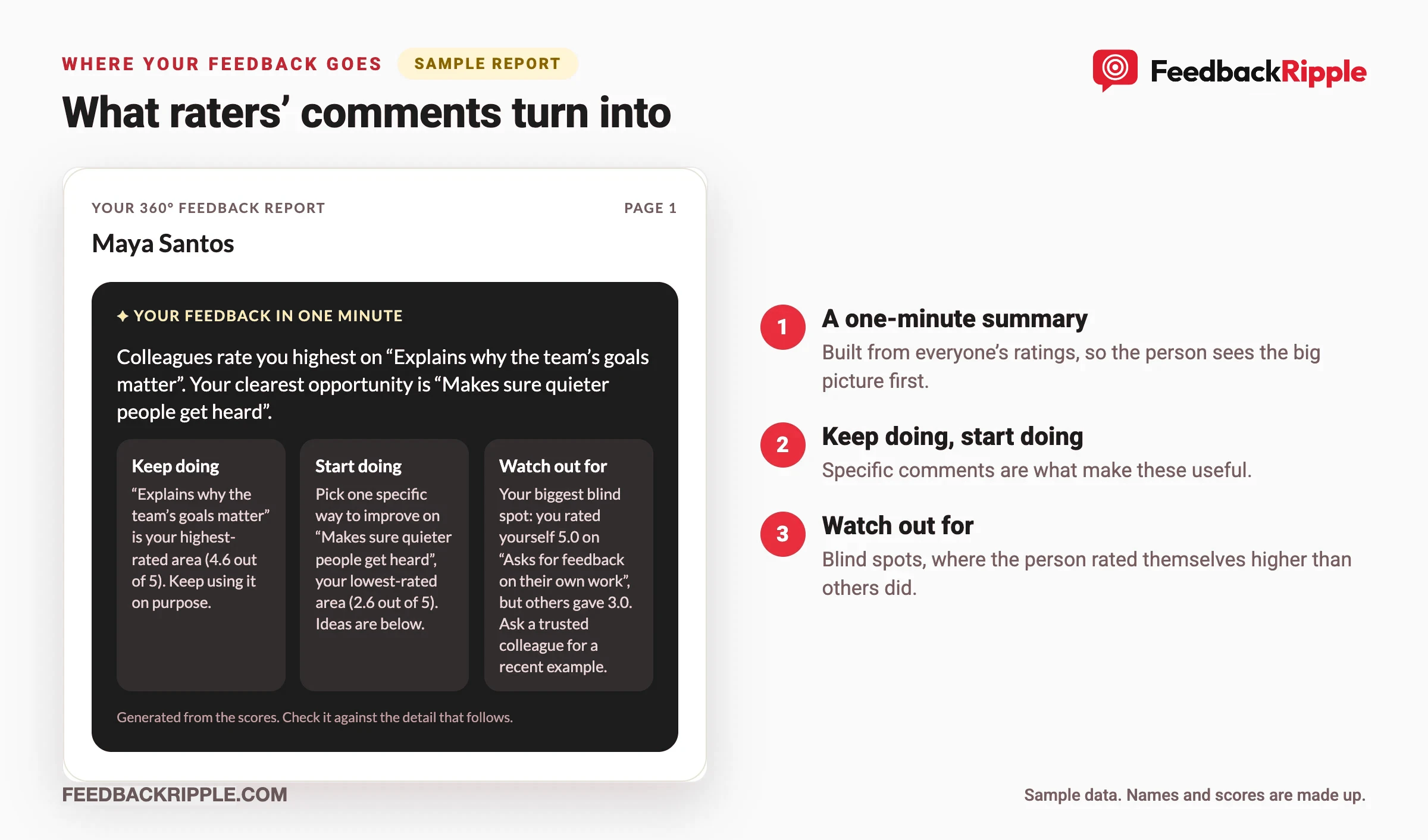
Reports vary a lot by tool. But a good one usually opens with a short summary, then shows scores by rater group, the biggest gaps between self and others, and the written comments. Here’s page one of a sample FeedbackRipple report (sample data, not a real person):
And here’s how the same report compares the person’s own view with their manager, peers and direct reports. This comparison is usually where the most useful conversation starts:

FeedbackRipple · First 3 people free
Get a 360 report that says what to do next
Describe your 360 in one sentence and FeedbackRipple drafts the questions, rater groups and invites. Your first 3 people are free.
How much does a 360 cost?
This is one of the most common questions, and one most guides skip. Costs depend mainly on whether you build it yourself, use dedicated software or include coaching. Here are typical ranges (prices checked in November 2026; they change, so confirm with each vendor):

| Option | Typical cost | What you get | Watch out for |
|---|---|---|---|
| DIY forms (Google Forms, SurveyMonkey) | Free to about $30 per user per month | Basic survey | No rater groups, anonymity rules or 360 report; lots of manual work |
| 360 software, pay per person | About $15–$100 per person | Rater management, anonymity, reports | Per-person prices add up for large rollouts |
| 360 software, annual plans | From a few hundred to a few thousand dollars a year | Many people per year, often admin and reporting tools | Minimum contracts on some platforms |
| Performance suites with 360 | Roughly $4–$25 per employee per month | 360 as part of reviews, goals and engagement | You pay for the whole suite, often with minimums |
| Coach-led 360 | Usually much higher per leader | Software plus interviews or a coached debrief | Price depends mostly on coaching time |
For example, FeedbackRipple costs $49 per person on pay as you go, $469 a year for coaches (12 people), $1,069 a year for teams (30 people) and from $5,029 a year for enterprises, with your first 3 people free. You can see how other tools compare in our list of the best 360 feedback software, and full details on our pricing page.
Who uses 360 feedback?
360s are used by organizations of almost every size and sector, but they tend to show up in a few places:
- Leadership development programs, for new managers, high-potential employees and senior leaders. See our leadership 360 assessment.
- Executive coaches, who often start an engagement with a 360 so that coaching is based on real input. See 360 for executive coaches.
- HR and L&D teams, to find common development needs across a group. See 360 for HR and L&D.
- Healthcare and the public sector, for instance the NHS Leadership Academy in the UK runs its own 360 tool for healthcare leaders.
- Growing companies that want managers to hear honest upward feedback early. See upward feedback.
Is 360 feedback a good idea? What the research says
Honestly, it depends on how it’s run. The best-known review of the research, by Smither, London and Reilly (2005), looked at 24 longitudinal studies and found that improvement after multisource feedback was generally small. And recent surveys show plenty of frustration: in a 2025 LiveCareer survey of 1,000 US workers, reported by SHRM, 48% said 360s amplify office politics.
But the same research shows when 360s work: when the feedback shows a real need to change, people react positively, believe change is possible, set goals and actually act on them. In practice, that means 360 feedback is usually a good idea when:
- It’s used for development, not pay.
- Anonymity is protected (at least 3 responses per group).
- Questions describe behaviors raters can see.
- Every report is followed by a private debrief.
- The person leaves with one to three goals and follow-up dates.
To give you a concrete example, at FeedbackRipple, we don’t simply hand over a chart and hope for the best. Every report ends with things to try in the next 30 days, rater groups under three are merged automatically, and Lucy, our AI coach, follows up for 90 days so that goals don’t quietly fade.
How to get started with 360 feedback
If you’re ready to try it, start small: pick a pilot group of 3 to 10 people, agree that it’s for development, and book debriefs before you send the first invite. You can use our free 360 feedback survey template as a starting point, or try FeedbackRipple free for your first 3 people.
And if you’re on the other side, about to receive your first 360, here’s our advice: read the report once, come back to it a day later, and go into the debrief with questions rather than a defense. It tends to make the whole thing far more useful.
FeedbackRipple · First 3 people free
Run your first 360 free
Anonymous by design, in 15 languages, with a report that tells people what to do next. Your first 3 people are free, no credit card.
The author

Venchito Tampon
Venchito Tampon is the Founder of FeedbackRipple, 360 feedback software that tells people what to do next. It helps executive coaches and HR and L&D teams run anonymous 360s, turn the results into clear guidance and follow through on development plans.
He is a Certified Executive Coach, certified by Symbiosis Coaching, an ICF-accredited coaching organization. He brings that coaching lens to FeedbackRipple: every report ends with clear next steps, not just charts.
He is also the CEO and Founder of eLearning Solutions Lab, a Philippines-based eLearning production company specializing in custom eLearning development and rapid eLearning solutions for global clients.
He founded Rainmakers Training & Consultancy, a corporate training and leadership development firm where he has trained and spoken at 250+ conventions, seminars, and workshops across the Philippines and internationally, including Singapore, Slovakia, and Australia. He has worked with top corporations including SM Hypermarket, Shell, and National Bookstore.
His other ventures include ExpirePilot, document expiration tracking software for small businesses, SharpRocket, a digital marketing and SEO company, and Hills & Valleys Cafe, a local café with available franchising.
He is a certified member of The Philippine Society for Talent Development (PSTD), the premier organization for Talent Development practitioners in the country, and an active Go Negosyo Mentor under the Mentor Me program.